User Management
Feature Detail
Description
This feature provides comprehensive user lifecycle management within the admin panel, enabling Organization Administrators and Global Administrators to invite new users, assign roles, and deactivate accounts across their organizations. The system supports the four defined roles (Peer Mentor, Coordinator, Organization Administrator, Global Administrator) and enforces multi-tenancy boundaries so that admins can only manage users within their authorized scope. User invitation flows include email delivery and onboarding guidance, while deactivation workflows ensure that active assignments and activities are gracefully handled before access is revoked.
User Flow
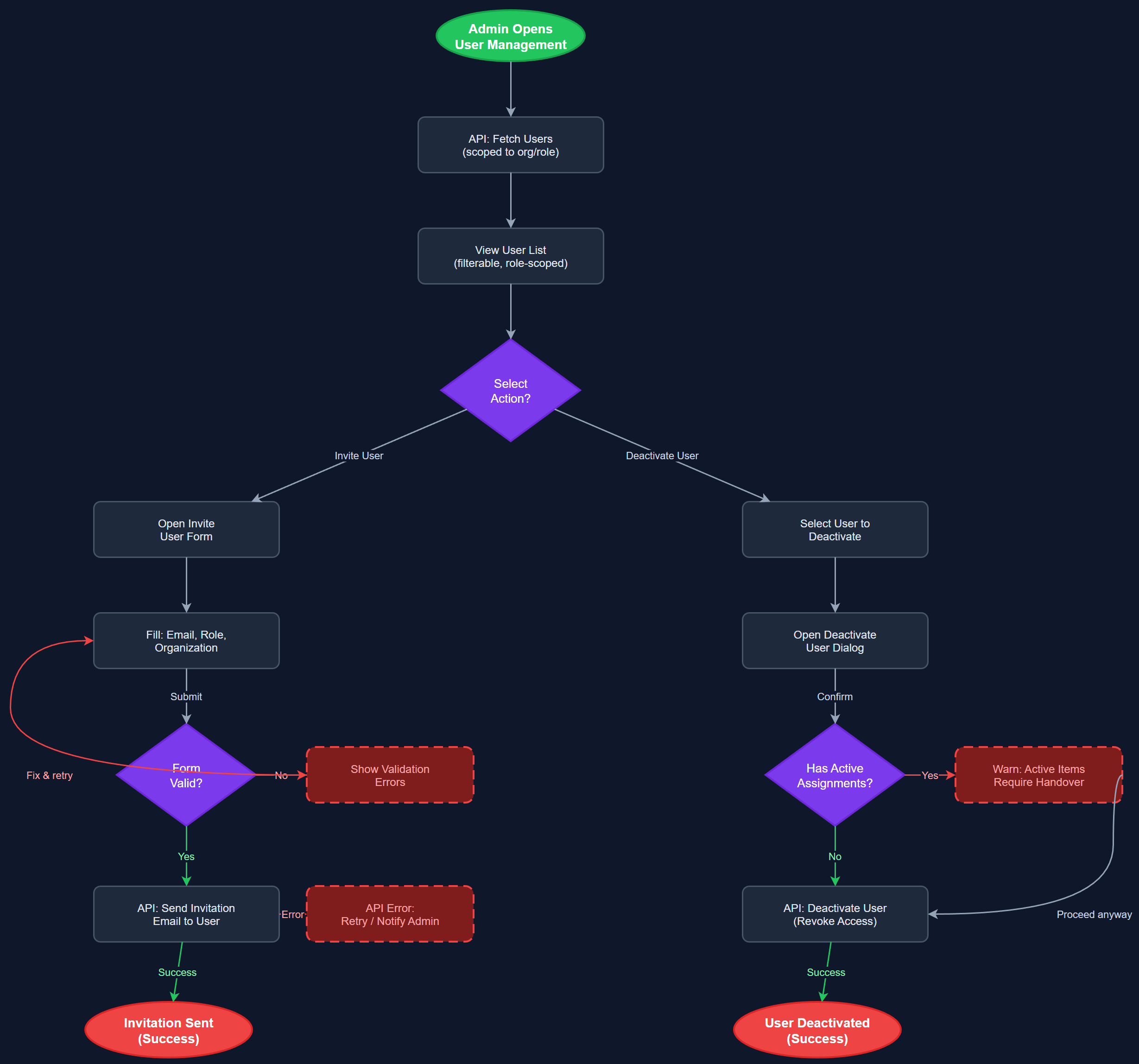
Analysis
Effective user management is the operational backbone of a multi-organization platform serving thousands of volunteers across 1,400+ local associations. Without a reliable way to invite, role-assign, and deactivate users, organizations cannot safely onboard peer mentors or offboard leavers, creating both security risks and administrative chaos. This feature directly enables coordinators and admins to maintain accurate role assignments, which in turn determines what data each user can access — a non-negotiable requirement given the sensitive personal data handled by the platform. Streamlined invitation and deactivation workflows reduce coordinator workload and support the platform's goal of being easy to administer at scale.
The admin panel is built as a Next.js web application served from the same Vercel deployment as the REST API, with user management routes under /admin/users. Backend endpoints follow the versioned REST pattern (/api/v1/admin/users) and enforce JWT-based authorization checks against the requesting user's role and organization scope. Invitation emails are dispatched via a transactional email provider (e.g., Resend or SendGrid) with time-limited signed tokens. The Flutter mobile app does not expose user management UI — this is admin-panel-only. PostgreSQL stores users and user_organization_roles with proper foreign key constraints. Deactivation sets a status flag rather than hard-deleting records to preserve audit history and activity attribution.
Dependencies
Definition of Done
Components (64)
Shared Components
These components are reused across multiple features
User Interface (16)
Service Layer (13)
Data Layer (9)
Infrastructure (20)
User Stories
No user stories have been generated for this feature yet.