Travel & Expense Registration
Feature Detail
Description
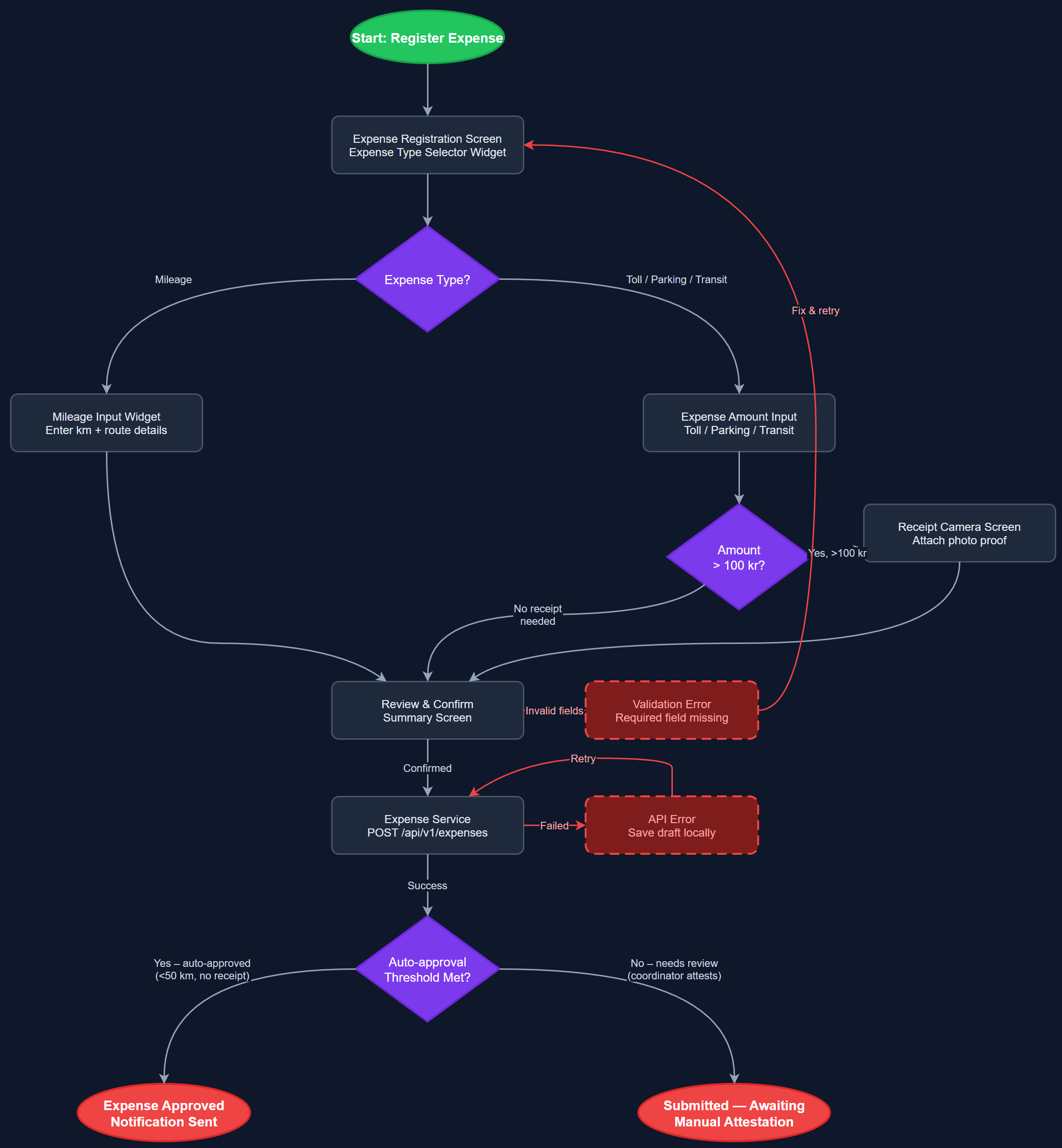
This feature enables peer mentors and coordinators to register travel reimbursements and out-of-pocket expenses directly in the mobile app, consolidating mileage, toll, parking, and public transport into a single streamlined workflow. The system enforces fixed expense type selections to prevent invalid combinations (e.g., kilometers and bus ticket simultaneously), replacing error-prone freetext entry. Default values and smart validation reduce cognitive load, making the majority of expense registrations a matter of seconds rather than minutes.
User Flow
Analysis
Expense and travel reimbursement is a significant pain point for both HLF and Blindeforbundet, where manual paper-based or Excel-driven processes introduce delays, errors, and administrative overhead. Automating this workflow reduces coordinator burden substantially, as reimbursement requests no longer need manual collation before submission. For peer mentors, a frictionless registration experience means expenses are logged promptly and accurately rather than being forgotten or estimated retroactively. The fixed-choice expense type model also enforces organizational policy at the point of entry, reducing rejected claims and reconciliation work downstream, directly lowering operational costs for finance teams.
The Flutter UI presents categorized expense type selectors using Riverpod-managed state, with conditional field rendering based on selected type (e.g., mileage input only visible when km is selected). BLoC handles validation logic including mutual-exclusion rules between incompatible expense types. The REST API endpoint (POST /api/v1/expenses) accepts structured expense payloads and persists to the expenses and expense_types PostgreSQL tables. Integration hooks connect to Xledger (Blindeforbundet) and HLF Dynamics portal via adapter services in the Next.js backend. WCAG 2.2 AA compliance requires all form controls to meet 4.5:1 contrast and 24×24px touch targets, with semantic labels for screen reader support.
Dependencies
Definition of Done
Components (66)
Shared Components
These components are reused across multiple features
User Interface (16)
Service Layer (13)
Data Layer (9)
Infrastructure (20)
User Stories
No user stories have been generated for this feature yet.