Speech-to-Text Input for Reports
Feature Detail
Description
Provides a speech-to-text input widget enabling peer mentors to dictate activity reports instead of typing on a mobile keyboard. Designed exclusively for post-activity report writing — never for recording during conversations, which workshop participants flagged as a serious privacy concern. The widget integrates into free-text fields across the activity wizard and structured report forms, supporting peer mentors with motor impairments, visual disabilities, or low typing proficiency on both iOS and Android platforms.
User Flow
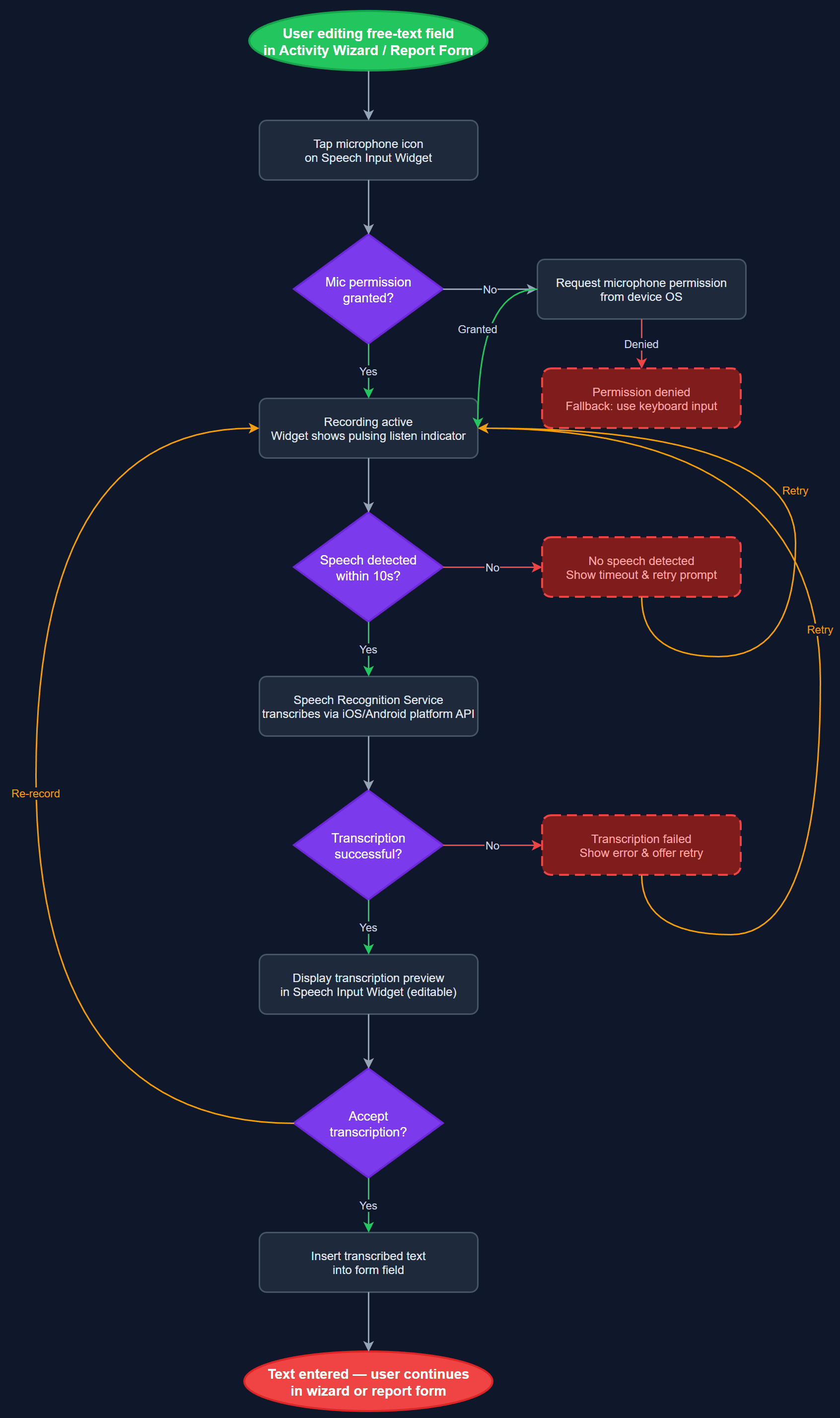
Analysis
For peer mentors with motor impairments, visual disabilities, or limited digital literacy, typing on a mobile keyboard is a significant barrier to complete and accurate reporting. Blindeforbundet and HLF both identified speech-to-text as an accessibility priority that increases report quality and length. Removing the typing barrier also encourages more detailed narrative entries, which improve the usefulness of activity records for coordinator review and organizational memory. This feature directly supports the WCAG 2.2 AA accessibility mandate and extends genuine usability to the broadest possible range of peer mentor profiles, including older volunteers who represent a significant portion of the user base.
Implemented using the Flutter speech_to_text plugin, which delegates to native platform APIs (iOS SpeechRecognizer, Android SpeechRecognizer) for on-device transcription with no audio storage or transmission. SpeechInputWidget is a reusable component wrapping any TextField with a microphone button, displaying live transcription and allowing correction before insertion. SpeechRecognitionService manages permission state (microphone), language selection (Norwegian Bokmål default), error recovery for recognition failures, and graceful degradation when the device lacks speech support. AudioProcessingInfrastructure configures the platform audio session to prevent conflicts with calls or media. WCAG compliance requires that the microphone button has a descriptive accessible label and that activation/deactivation state is announced to screen readers via Semantics.
Dependencies
Definition of Done
Components (60)
Shared Components
These components are reused across multiple features
User Interface (16)
Service Layer (13)
Data Layer (9)
Infrastructure (20)
User Stories
No user stories have been generated for this feature yet.