Scenario-Based Reminders & Automated Follow-Up Alerts
Feature Detail
Description
This feature delivers automated, context-aware push reminders triggered by specific scenarios in the platform workflow. Scenarios include: no contact registered within 10 days of an assignment dispatch (Blindeforbundet-critical), upcoming or expired peer mentor certification, missed activity follow-up, and configurable coordinator-defined reminder rules. Users can manage their reminder preferences through a dedicated settings screen, and coordinators can configure scenario thresholds at the organization level. The feature merges Automatic Follow-Up Reminders, 10-Day Contact Reminder, Certification Expiry Alerts, and Scenario Push Messages into a unified rules engine.
User Flow
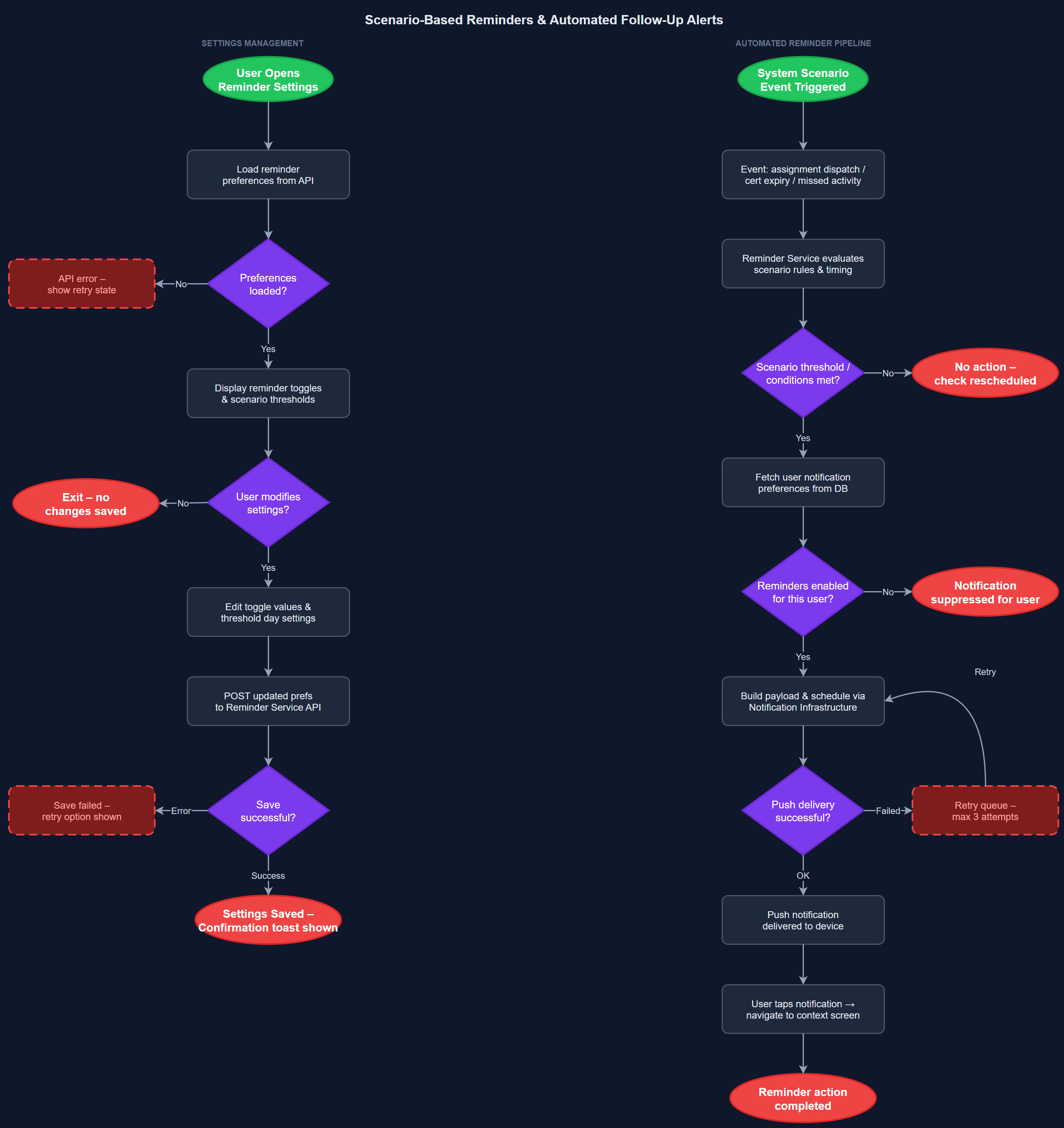
Analysis
Scenario-based reminders directly address two of the most critical operational pain points identified across workshops. For Blindeforbundet, the 10-day automatic reminder after assignment dispatch ensures no vulnerable individual falls through the cracks when a peer mentor fails to make contact — this is a safeguarding requirement, not merely a convenience. For HLF, certification expiry alerts prevent situations where uncertified peer mentors remain listed as active, which has reputational and compliance implications. By automating follow-up logic that coordinators currently manage manually, this feature reduces administrative burden, increases reliability of outreach, and enables coordinators to focus on escalations rather than routine chasing.
The reminder engine is implemented as a scheduled job on the Next.js backend, running at configurable intervals (e.g., every 6 hours) via Vercel Cron Jobs. Each scenario is modeled as a rule with trigger conditions (e.g., assignment.status = 'dispatched' AND days_since_dispatch >= 10 AND contact_activity_count = 0), a target audience (assignee, coordinator, or both), and a notification template. Rules are evaluated against the PostgreSQL database on each cron cycle. Scheduled notifications (e.g., certification expiry 30 days before) are pre-computed and stored in a reminders table with a scheduled_at timestamp, consumed by the cron job. The reminder settings screen allows users to opt out of non-critical reminders. Notification delivery reuses the FCM infrastructure from the push-notifications feature. Care must be taken to avoid notification flooding — deduplication logic ensures each scenario fires at most once per trigger event.
Dependencies
Definition of Done
Components (62)
Shared Components
These components are reused across multiple features
User Interface (16)
Service Layer (13)
Data Layer (9)
Infrastructure (20)
User Stories
No user stories have been generated for this feature yet.