Role-Specific Home Dashboard
Feature Detail
Description
The Role-Specific Home Dashboard provides a tailored entry point for each of the four user roles: Peer Mentor, Coordinator, Organization Administrator, and Global Administrator. Each role sees a home screen optimized for their primary tasks, surfacing relevant shortcuts, recent activity, and role-appropriate calls to action. The bottom navigation bar with five tabs (Home, Contacts, Add, Work, Notifications) is the persistent navigation anchor for all mobile users, ensuring fast access to core functionality from any screen in the app.
User Flow
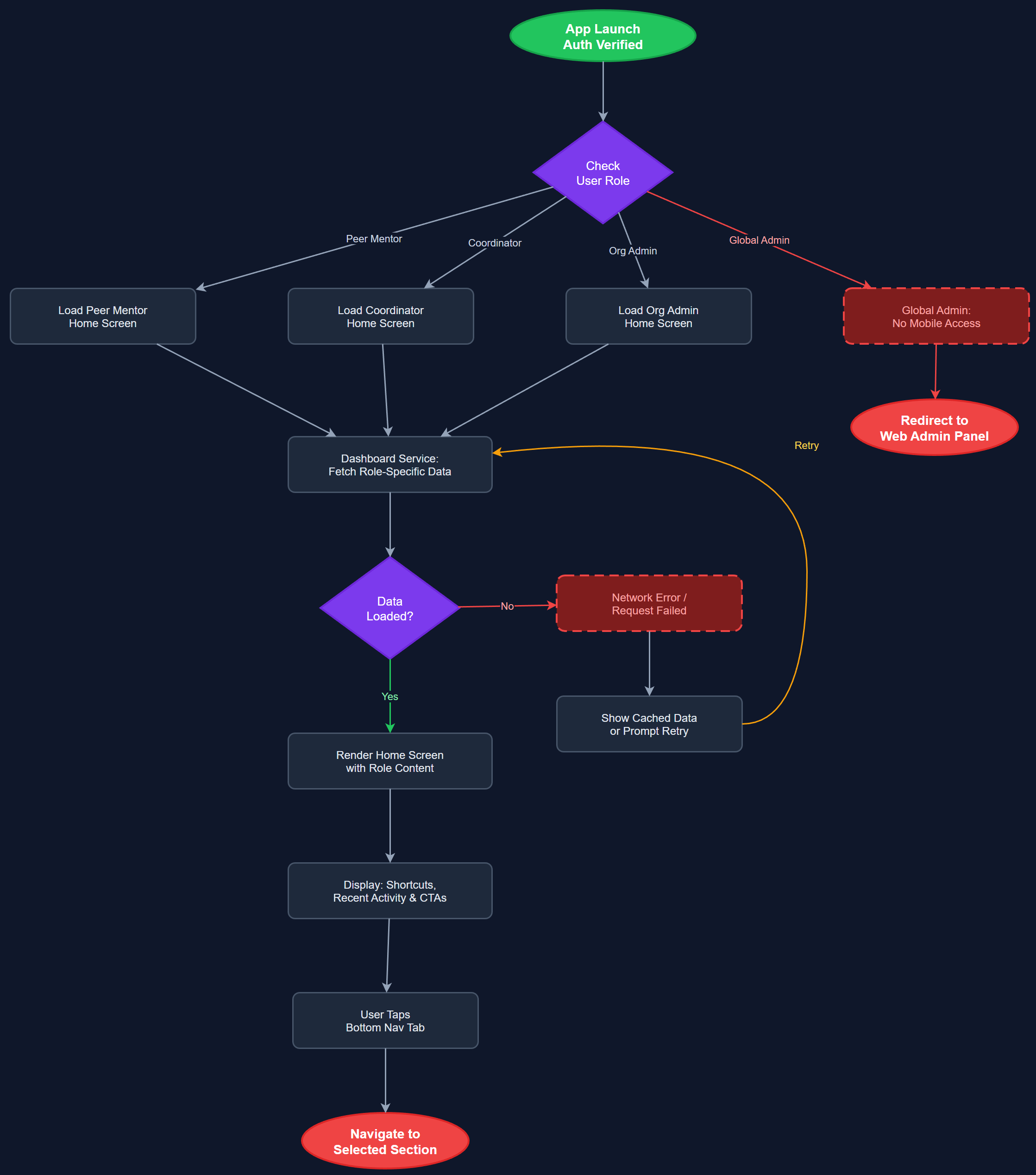
Analysis
A role-specific home screen dramatically reduces cognitive load by eliminating irrelevant options and surfacing exactly what each user type needs at launch. For peer mentors, this means a one-tap path to activity registration; for coordinators, immediate visibility into team status and pending approvals. Presenting the right information to the right user from the first screen directly supports the core design principle of minimal cognitive burden established across all three workshop organizations. This feature also anchors the bottom navigation system, which is the structural backbone of the entire mobile app experience and a prerequisite for all other mobile navigation patterns.
Implemented in Flutter using BLoC for role-aware state management, with the home screen widget tree conditionally rendered based on the authenticated user's role fetched from the auth state. The bottom navigation bar is a persistent shell widget wrapping all five tab destinations using Flutter's NavigationBar (Material 3). Role determination happens post-authentication via the JWT claims or a lightweight /me endpoint call. Each role variant is a separate widget subtree to keep logic clean and testable. WCAG 2.2 AA compliance requires semantic labels on all nav bar items, visible focus indicators, and minimum 44dp touch targets on all interactive elements per Flutter accessibility guidelines.
Dependencies
Definition of Done
Components (64)
Shared Components
These components are reused across multiple features
User Interface (16)
Service Layer (13)
Data Layer (9)
Infrastructure (20)
User Stories
No user stories have been generated for this feature yet.