Receipt Photo Upload
Feature Detail
Description
This feature allows peer mentors to attach photos of physical receipts directly to expense registrations using the device camera or photo library. Receipts are required for expenses above a configurable threshold (e.g., 100 NOK for HLF) and are stored securely with a link to the parent expense record. The upload workflow is embedded in the expense registration flow and accessible as a standalone attachment action, supporting both immediate capture and deferred upload.
User Flow
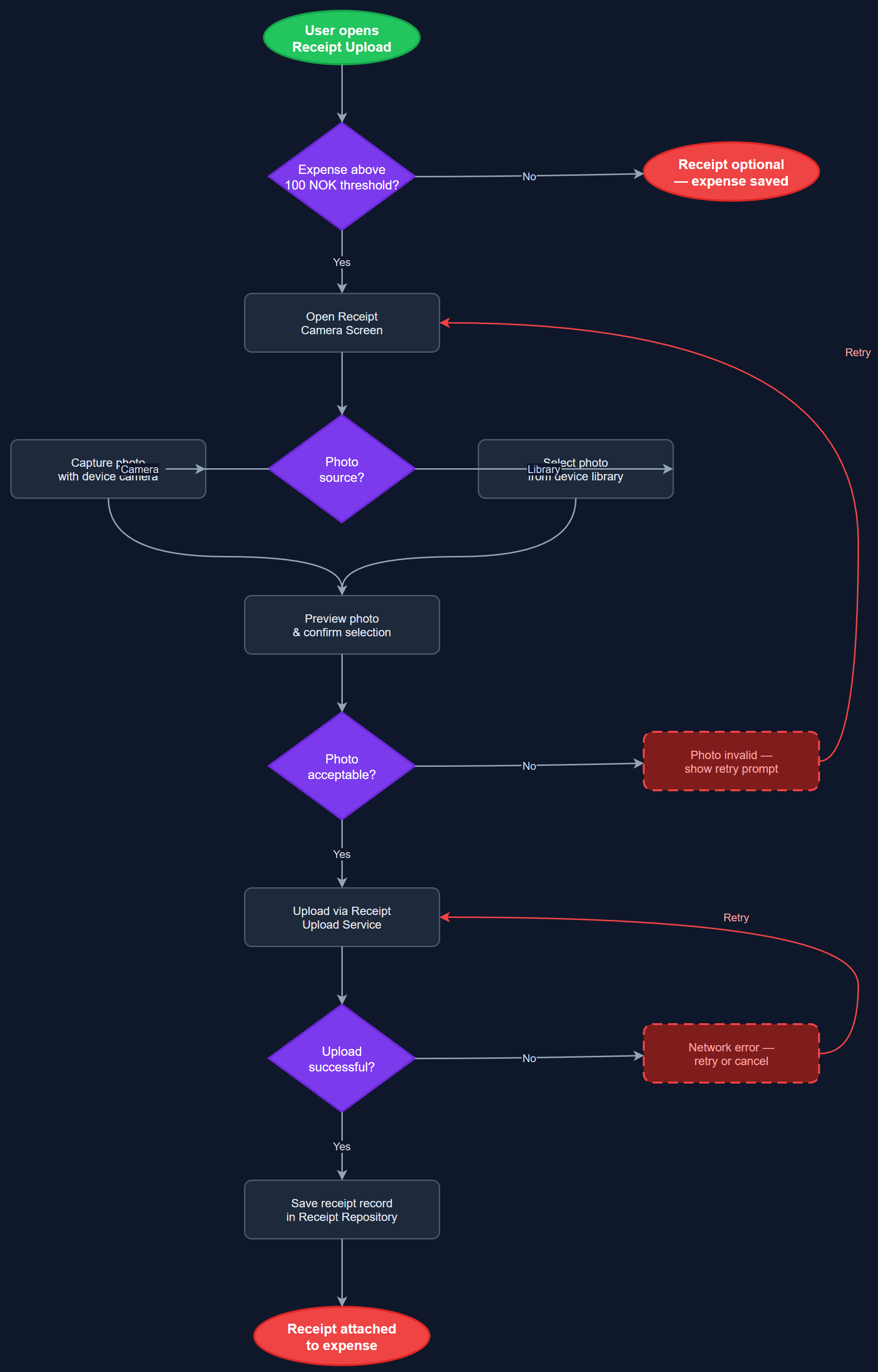
Analysis
Physical receipt handling is a major friction point in reimbursement workflows, requiring peer mentors to retain paper receipts and submit them through separate channels. Digitizing this process at the point of registration eliminates lost receipts, reduces processing time for coordinators, and creates an auditable digital trail that satisfies Bufdir documentation requirements. For HLF specifically, the threshold-based receipt requirement (above 100 NOK) is a compliance necessity, and enforcing it in-app prevents incomplete claims from entering the approval pipeline. This directly reduces back-and-forth between coordinators and peer mentors and accelerates reimbursement cycle times.
The Flutter implementation uses the image_picker package for camera and gallery access, with image compression applied before upload to balance quality and storage cost. Uploaded files are sent to the Next.js backend via multipart POST (/api/v1/receipts), stored in object storage (e.g., S3-compatible), and referenced in the receipts PostgreSQL table with a foreign key to expenses. The UI enforces the threshold rule client-side (prompting for receipt when expense amount exceeds the configured limit) with server-side validation as a safeguard. Secure storage ensures receipt images are scoped to the owning organization and not accessible cross-tenant. WCAG 2.2 AA requires accessible camera trigger buttons and confirmation feedback for successful uploads.
Dependencies
Definition of Done
Components (64)
Shared Components
These components are reused across multiple features
User Interface (16)
Service Layer (13)
Data Layer (9)
Infrastructure (20)
User Stories
No user stories have been generated for this feature yet.