Push Notifications
Feature Detail
Description
Push Notifications enable the mobile app to deliver real-time alerts and updates to peer mentors, coordinators, and administrators even when the app is not actively in use. The system handles notification delivery infrastructure, permission management, badge counts, and a dedicated notifications screen where users can review their notification history. Notifications are tied to key events such as new assignments, activity reminders, approval outcomes, and system messages, ensuring users stay informed without needing to actively check the app.
User Flow
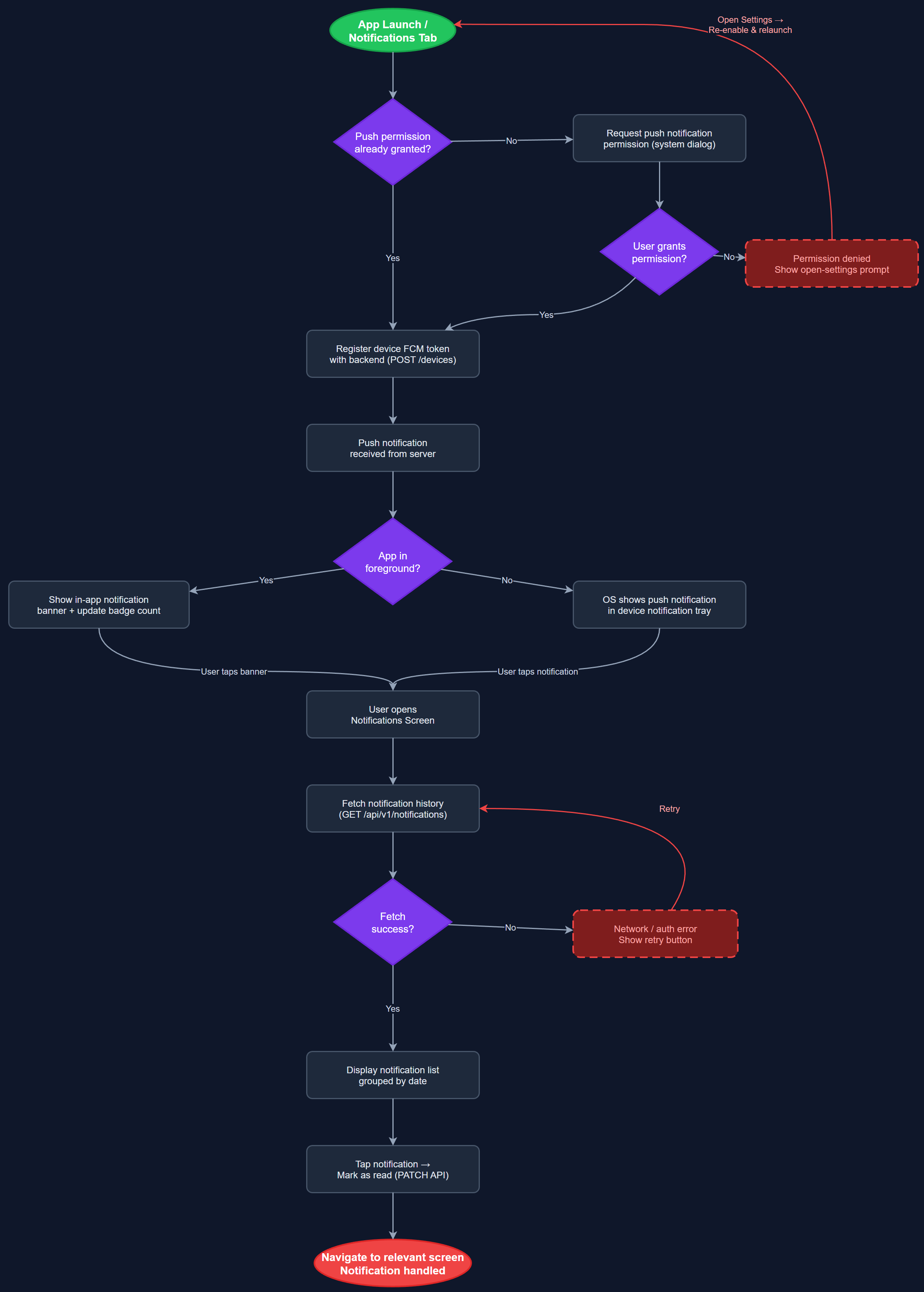
Analysis
Push notifications are a foundational engagement mechanism for a mobile-first volunteer platform. Without reliable push delivery, coordinators miss time-sensitive approval requests, peer mentors miss assignment dispatches, and the platform loses its real-time utility. For organizations like HLF and Blindeforbundet, where follow-up timeliness is a documented pain point, push notifications directly address the 40% dissatisfaction rate around peer mentor follow-up. By surfacing the right information at the right moment, notifications reduce the coordination overhead on administrators and increase the responsiveness of the entire volunteer network, which is central to the platform's value proposition.
Implementation uses Flutter's firebase_messaging package with Firebase Cloud Messaging (FCM) as the cross-platform delivery backbone for both iOS and Android. The backend (Next.js on Vercel) sends notifications via FCM server-side SDK triggered by database events or scheduled jobs. Device tokens are registered on login and stored against user records in PostgreSQL. The notifications screen is a paginated list of past notifications stored server-side, ensuring users can review history even after dismissing alerts. Permission handling follows platform best practices: iOS requires explicit opt-in prompt, Android 13+ requires POST_NOTIFICATIONS permission. Badge counts are managed via the notification payload and reset on screen visit. All notification content must be accessible and screen-reader compatible per WCAG 2.2 AA requirements.
Dependencies
Definition of Done
Components (63)
Shared Components
These components are reused across multiple features
User Interface (16)
Service Layer (13)
Data Layer (9)
Infrastructure (20)
User Stories
No user stories have been generated for this feature yet.