Peer Mentor Pause & Temporary Deactivation
Feature Detail
Description
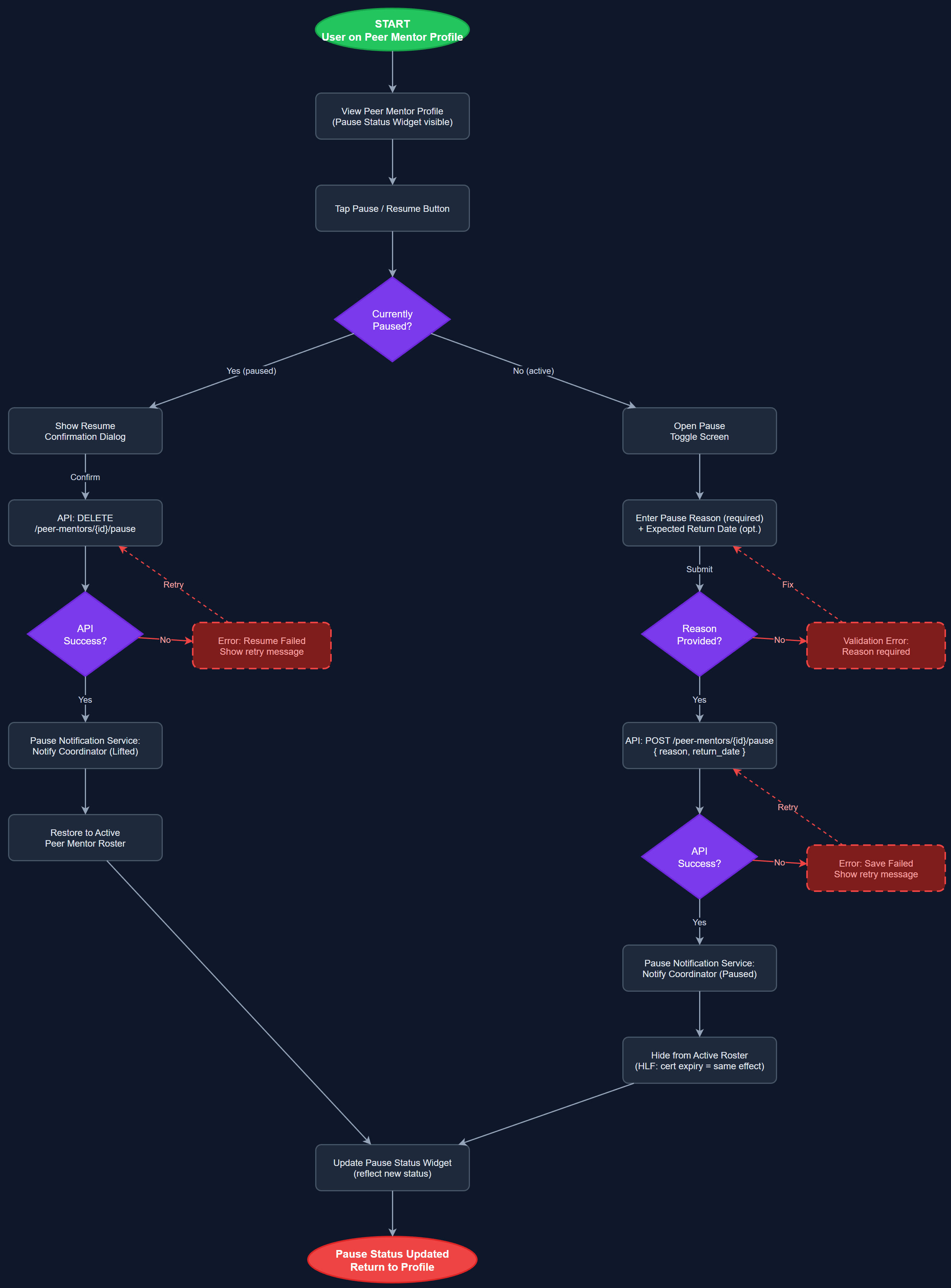
This feature allows peer mentors to temporarily pause their availability without fully deactivating their account or losing their history and assignments. A pause status widget displays the current status prominently on the peer mentor profile. A dedicated pause toggle screen guides the user through setting a pause reason and optionally an expected return date. The Pause Notification Service automatically notifies the relevant coordinator when a pause is activated or lifted. For HLF, pausing is also linked to certification expiry — an expired certification automatically triggers a paused-equivalent state that hides the mentor from public rosters.
User Flow
Analysis
Peer mentoring is voluntary work and life circumstances change. Without a formal pause mechanism, mentors who need a break are forced to either stay active (leading to burnout and missed contacts) or fully deactivate (losing their history and requiring re-onboarding). Neither outcome is acceptable for organizations trying to retain experienced volunteers. The pause feature reduces churn by providing a dignified off-ramp that preserves the mentor's data and relationships. Coordinator notification on status change closes the communication gap identified in HLF's survey — coordinators currently discover mentor unavailability only when assignments go unanswered, creating risk for vulnerable contacts who are not followed up.
The pause state is stored in the peer_mentor_status_logs table with a status enum (active, paused, suspended), reason text, and optional return_date. The PeerMentorService exposes a `pauseMentor(id, reason, returnDate)` method that writes the log entry and triggers the Pause Notification Service. The notification service calls the Push Notification Service with a coordinator-targeted message. The PauseStatusWidget is a colored banner injected at the top of the PeerMentorDetailScreen, driven by the latest status log entry. For HLF's certification-linked pause, a background job in the backend compares certification expiry dates daily and auto-creates pause log entries. The pause toggle screen uses AppButton and AppTextField widgets from the design system and includes a confirmation step to prevent accidental pauses.
Dependencies
Definition of Done
Components (64)
Shared Components
These components are reused across multiple features
User Interface (16)
Service Layer (13)
Data Layer (9)
Infrastructure (20)
User Stories
No user stories have been generated for this feature yet.