Organization Settings & Terminology Configuration
Feature Detail
Description
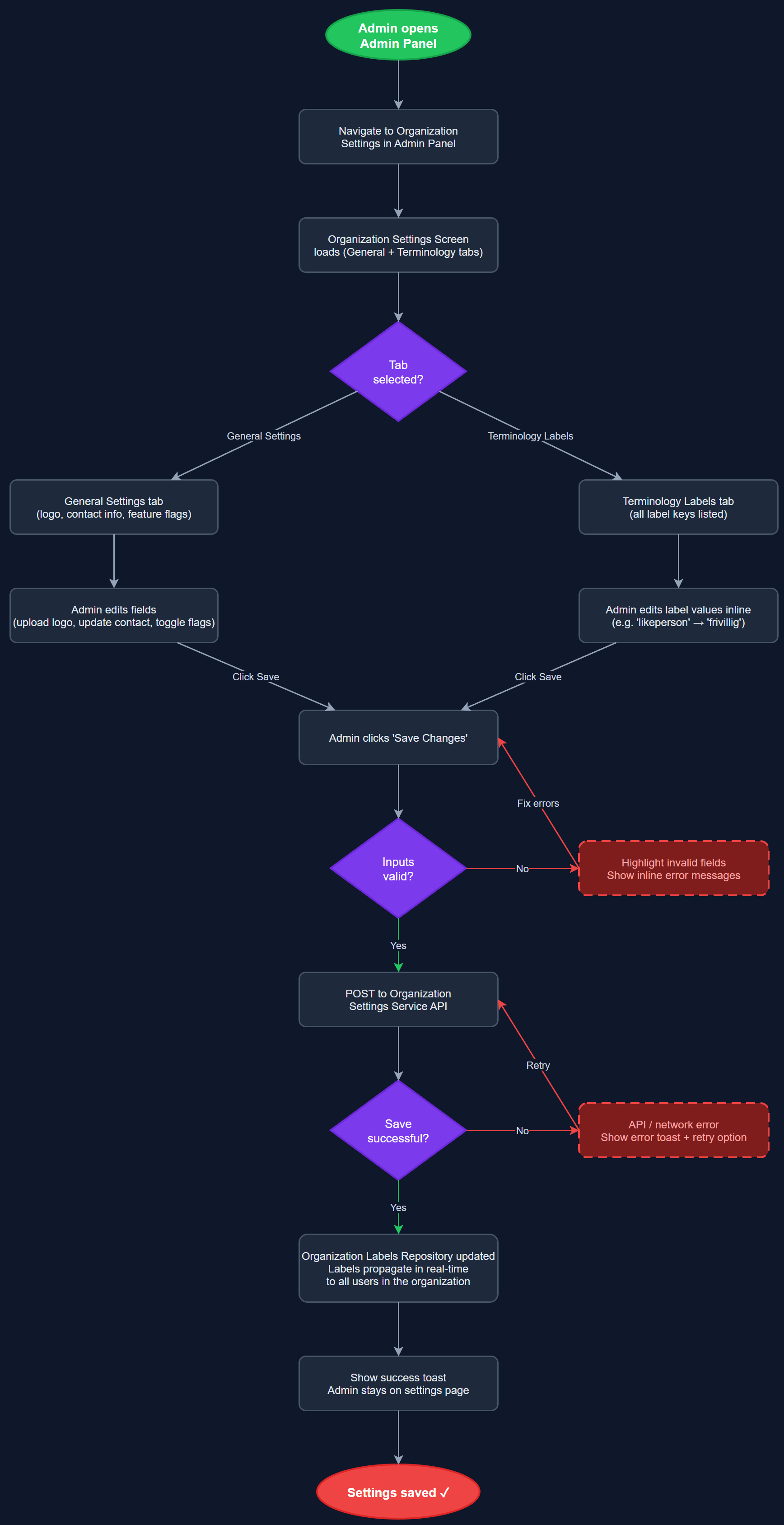
This feature enables each organization to customize the terminology and labels used throughout the mobile app and admin panel, reflecting the fact that different organizations use different words for the same concepts (e.g., 'likeperson' vs 'frivillig', 'oppdrag' vs 'aktivitet'). Administrators can edit string labels via a terminology editor screen, with changes propagating to all users in that organization in real time. The feature also covers broader organization settings such as contact details, logo, and configuration flags that control which optional features are enabled for that organization's deployment.
User Flow
Analysis
Each of the four partner organizations (NHF, Blindeforbundet, HLF, Barnekreftforeningen) uses distinct terminology rooted in their culture and history. Forcing a single vocabulary onto all organizations would create friction, reduce adoption, and undermine trust. A dynamic terminology system allows the platform to serve as a white-label foundation where each organization sees their own language, increasing the sense of ownership and reducing training overhead. This also future-proofs the platform for onboarding additional organizations with their own vocabularies without requiring code changes, which is a key commercial differentiator for Norse Digital Products.
The organization_labels table stores key-value pairs per organization, loaded server-side and injected into the Flutter app at login or organization-switch time. The mobile app references label keys rather than hardcoded strings, resolving them from the loaded label map. The Next.js admin panel provides a terminology editor UI that fetches current labels via /api/v1/admin/organizations/{id}/labels and patches changes via PUT. Labels are cached on the client with cache invalidation on organization switch. For the Flutter side, a Riverpod provider manages the labels state and exposes a helper method for resolving any label key. Settings flags (feature toggles per organization) are stored as JSONB in the organizations table and validated against a known schema to prevent invalid configurations.
Dependencies
Definition of Done
Components (64)
Shared Components
These components are reused across multiple features
User Interface (16)
Service Layer (13)
Data Layer (9)
Infrastructure (20)
User Stories
No user stories have been generated for this feature yet.