Organization Selection & Onboarding
Feature Detail
Description
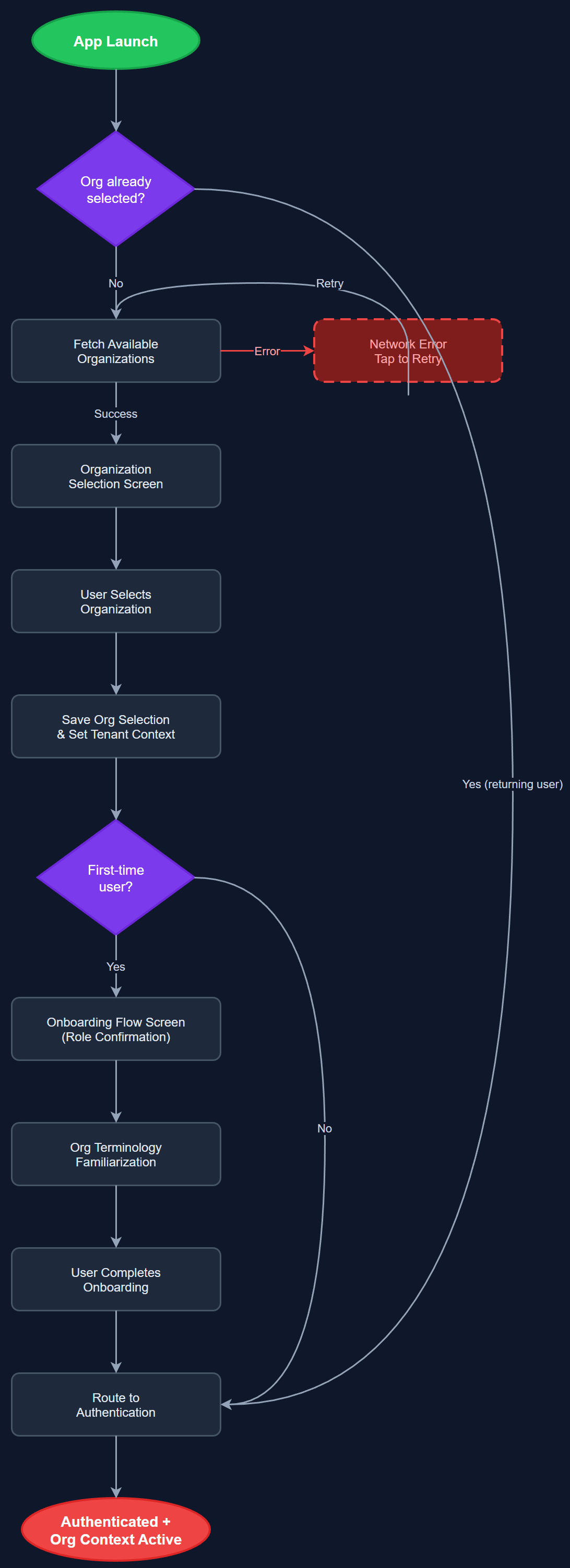
This feature presents users with an organization selection screen upon first launch, allowing them to choose from available organizations (NHF, Blindeforbundet, HLF, Barnekreftforeningen, etc.) before proceeding with authentication. The onboarding flow guides new users through initial setup steps including role confirmation and terminology familiarization specific to their organization. It ensures users are routed to the correct organizational context and that all subsequent data is scoped to the right tenant from the very first interaction.
User Flow
Analysis
Multi-tenancy is a foundational requirement of the platform: each organization has its own labels, settings, and member data. Without organization selection, users cannot be correctly scoped, and data isolation breaks down entirely. The onboarding flow reduces drop-off for new users by contextualizing the app experience to their specific organization's terminology and workflow from the first screen. This directly improves adoption rates across all four partner organizations and ensures coordinators and peer mentors immediately feel at home rather than navigating a generic interface.
Implemented as a Flutter screen using BLoC for state management. The organization list is fetched from the REST API (/api/v1/organizations) and cached locally. Multi-tenancy context (organization ID, labels) is stored in Riverpod global state and injected into all subsequent API calls via request interceptors. The onboarding flow uses a step-based navigator with conditional routing depending on whether the user is new or returning. Deep links and stored preferences allow returning users to skip selection on subsequent launches.
Components (62)
Shared Components
These components are reused across multiple features
User Interface (16)
Service Layer (13)
Data Layer (9)
Infrastructure (20)
User Stories
No user stories have been generated for this feature yet.