Notes
Feature Detail
Description
This feature provides a notes system allowing peer mentors and coordinators to create, edit, and delete freeform text notes linked to specific contacts. A notes list screen displays all notes for a contact in reverse chronological order. A note editor screen supports rich text input with optional speech-to-text integration. The Notes Service handles persistence and access control, while the Notes Repository manages database operations. Notes are searchable via the Contact List & Search feature and are visible only to the author and their coordinator, respecting privacy requirements across all organizations.
User Flow
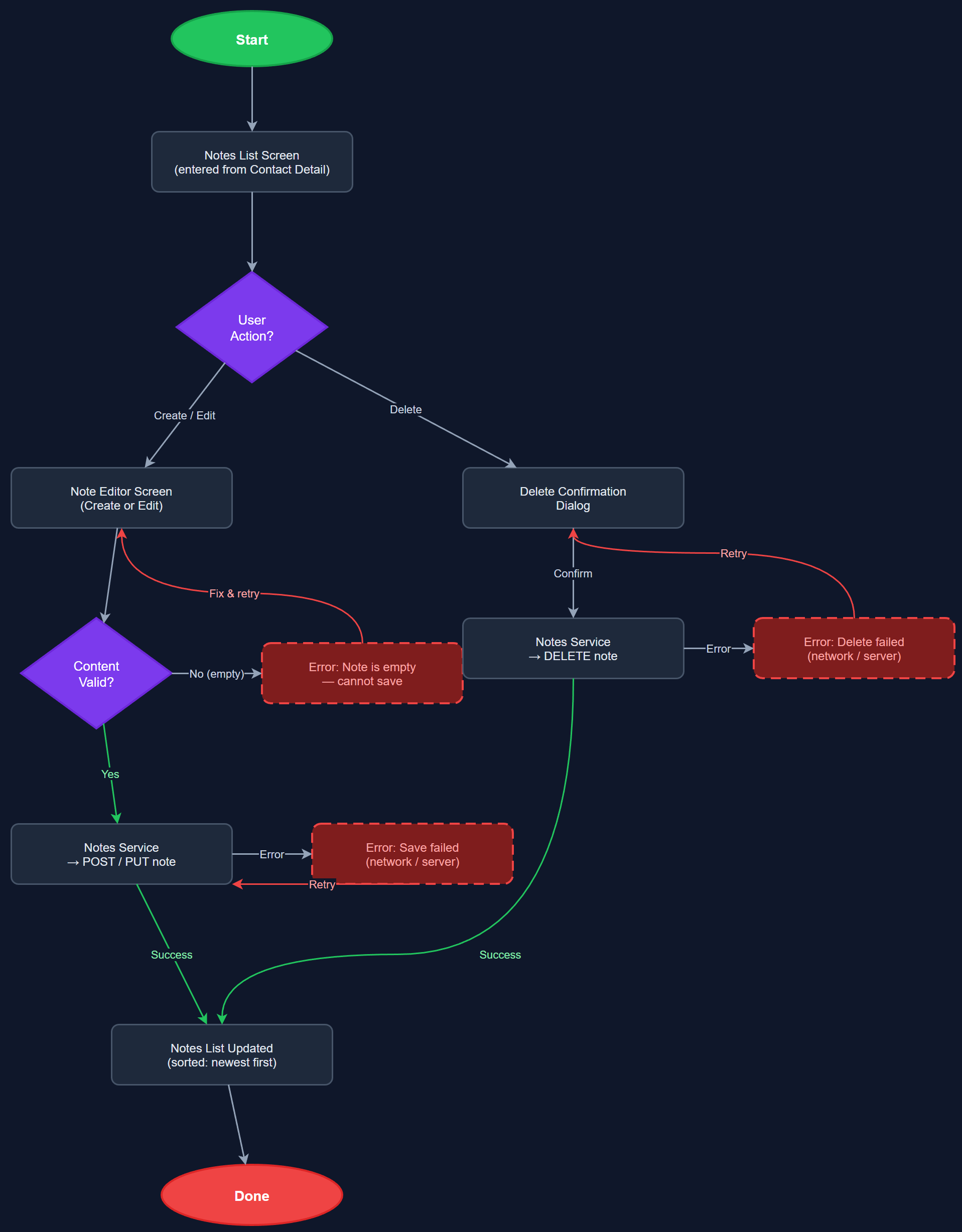
Analysis
Freeform notes are the primary tool for capturing qualitative context about a contact that does not fit into structured activity fields — observations about health, mood, living situation, or follow-up reminders. Without a notes feature, peer mentors resort to personal phone notes or memory, leading to information loss between visits and poor continuity of care. For coordinators reviewing a mentor's caseload, notes provide the contextual layer that statistics alone cannot convey. The inclusion of notes in the search feature (merged from 'Basic Search for Contacts and Notes') multiplies the value by making historical context instantly retrievable, reducing duplicate effort and improving the quality of formalized reports for Bufdir submissions.
Notes are stored in the notes table with foreign keys to both users (author) and contacts. The NotesListScreen is a section within ContactDetailScreen, rendered as a chronological feed of NoteCardWidgets. The NoteEditorScreen uses a Flutter TextField with multiline support; speech-to-text input is wired through the SpeechRecognitionService when that feature is available, falling back to keyboard-only gracefully. The Notes Service enforces row-level access control: a peer mentor can only read/write their own notes; a coordinator can read notes from mentors in their local association. API endpoints follow the `/api/v1/contacts/:contactId/notes` pattern. Notes content is included in the FTS5 local search index for offline search capability. Soft-delete is used to preserve audit history without exposing deleted content.
Dependencies
Definition of Done
Components (63)
Shared Components
These components are reused across multiple features
User Interface (16)
Service Layer (13)
Data Layer (9)
Infrastructure (20)
User Stories
No user stories have been generated for this feature yet.