Formalized Home Visit Report Structure
Feature Detail
Description
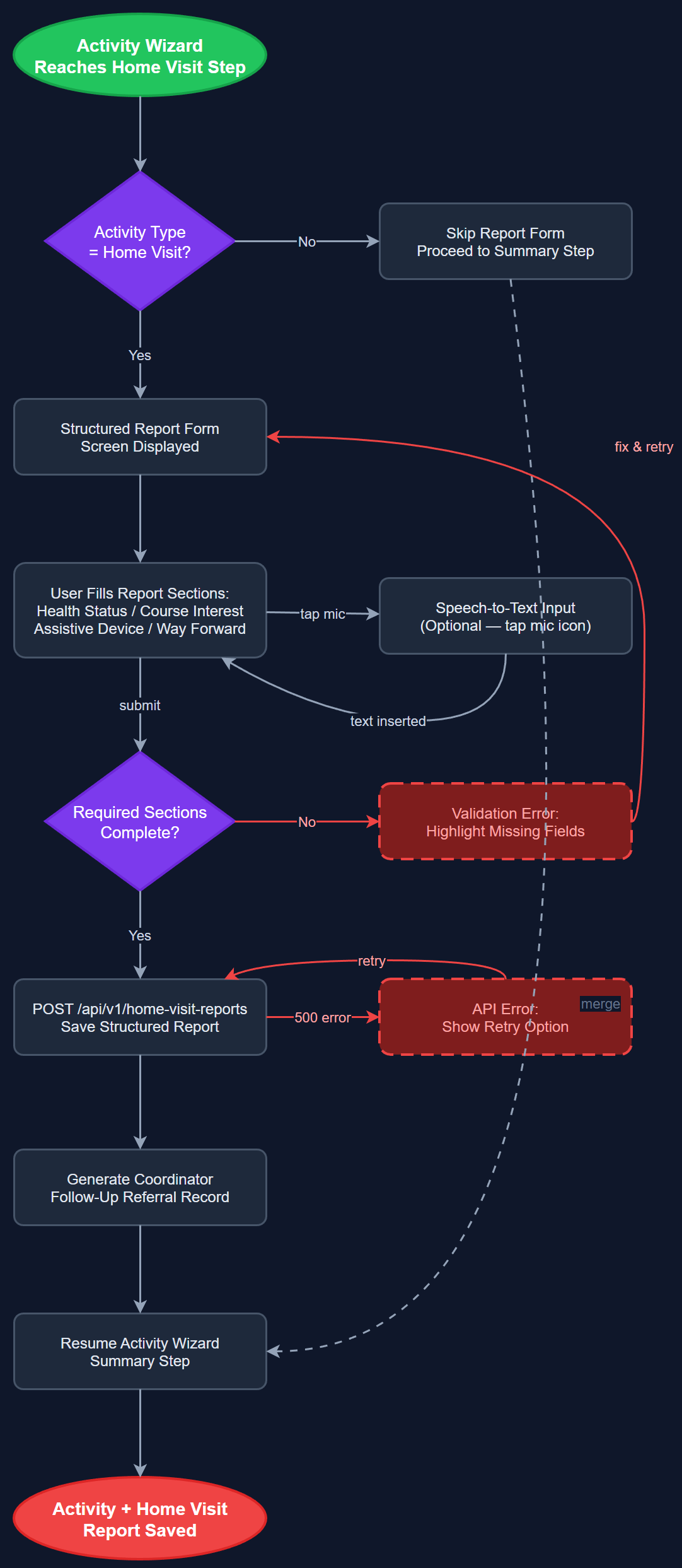
Provides a structured digital report template for post-home-visit documentation, replacing Blindeforbundet's current Word-form process. The template captures health status, course interest, assistive device situation, and a 'way forward' field that generates actionable coordinator follow-ups. The form appears as a conditional wizard step when the activity type is home visit, integrating structured documentation directly into the standard registration flow and creating a machine-readable referral record linked to each visit.
User Flow
Analysis
Blindeforbundet peer mentors conduct home visits requiring standardized post-visit reports to ensure consistent data collection and generate coordinator follow-up tasks. The current Word form is difficult to complete on mobile, inconsistently filled, and forces coordinators to manually extract structured information from free-text submissions. A digital structured form ensures completeness, enables automated aggregation of health and needs data across the organization, and creates a direct link between field observations and coordinator task queues. The 'way forward' field functions as a lightweight digital referral mechanism that currently requires a separate communication channel, reducing the risk of coordinator follow-ups being lost between report submission and action.
StructuredReportFormScreen is a conditional wizard step injected by WizardStateManager when the selected activity type is identified as a home visit category. ReportTemplateService fetches the active template from /api/v1/report-templates, allowing organization administrators to configure field visibility and labels per organization via the admin panel. ReportTemplateRepository caches templates locally for offline form completion. All form controls use AppTextField, custom radio groups, and checkbox widgets from the design system, complying with WCAG 2.2 AA. Speech-to-text input is available on all free-text fields. Flutter form validation surfaces field-level errors through accessible Semantics widgets for screen reader announcement. The 'way forward' field creates a structured coordinator task record in the backend, queryable in the admin panel.
Dependencies
Definition of Done
Components (62)
Shared Components
These components are reused across multiple features
User Interface (16)
Service Layer (13)
Data Layer (9)
Infrastructure (20)
User Stories
No user stories have been generated for this feature yet.