External Resource Links
Feature Detail
Description
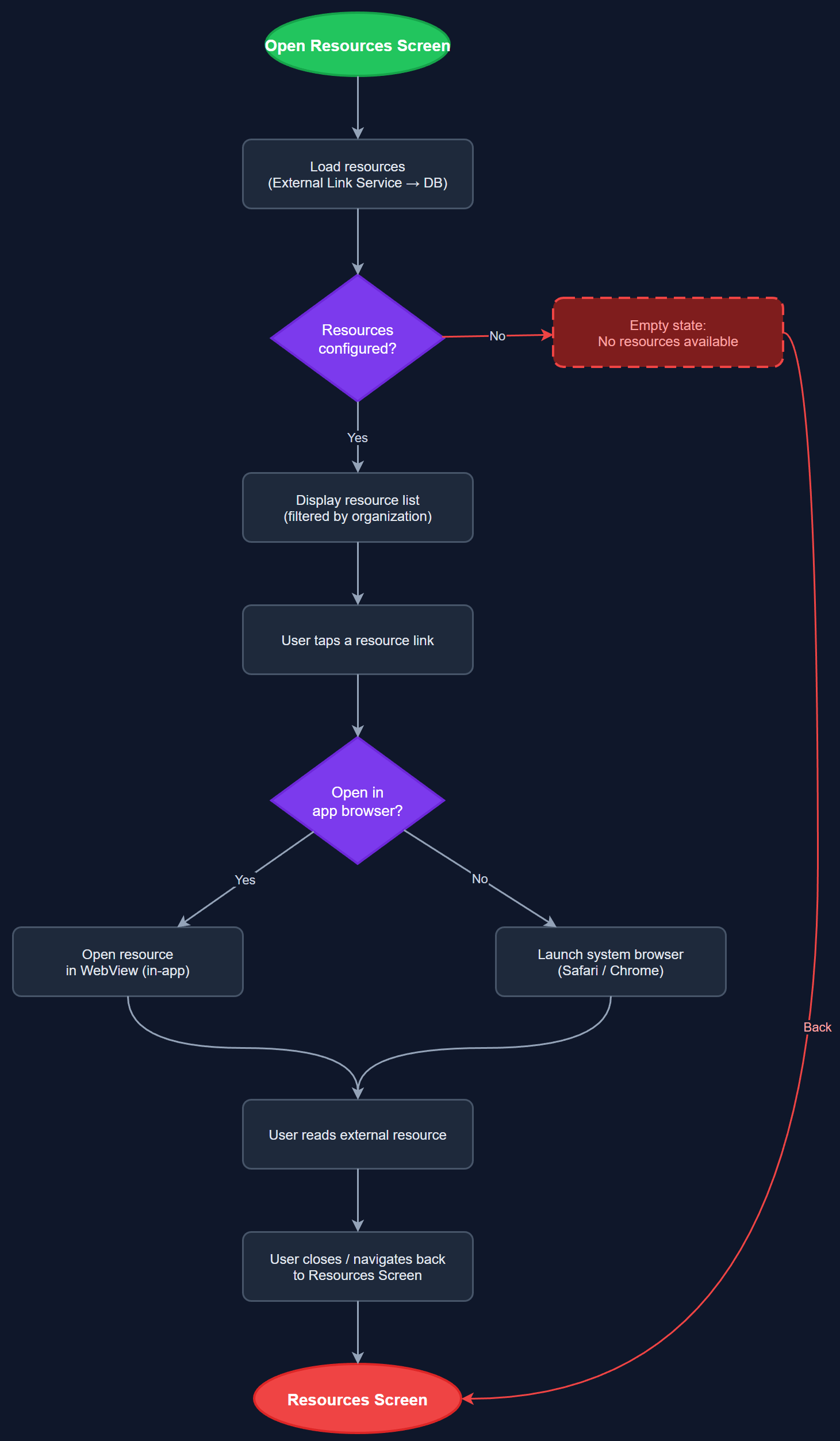
The External Resource Links feature provides a curated, organization-configurable list of external resources accessible from the app's Tools or Settings area. Each organization can configure relevant links — such as training materials, policy documents, national guidelines, and partner websites — that are surfaced to users based on their organization context. Links open in an in-app browser or the system browser depending on configuration, ensuring users have quick access to authoritative reference material without leaving the app context unnecessarily.
User Flow
Analysis
All four workshop organizations identified external resource links as a valuable feature for peer mentors who frequently need access to national guidelines, training materials, and organizational policies during field work. Surfacing these links in-app removes the need for peer mentors to navigate external websites independently, reducing errors and ensuring they reference up-to-date, organization-approved materials. From an organizational perspective, centrally managed resource links ensure content consistency across all peer mentors and reduce coordinator overhead in distributing reference materials. This feature also supports onboarding by giving new peer mentors immediate access to essential documentation.
Resources are fetched from the REST API as an organization-scoped list, cached locally for offline access, and rendered as a simple list screen. Each resource entry contains a title, description, URL, and optional icon/category. The Flutter implementation uses url_launcher for opening links, with a configurable in-app WebView option via webview_flutter for supported link types. The admin panel (Next.js) provides the management interface for adding, editing, and reordering resources per organization. Cache invalidation uses a lightweight ETags or last-modified header strategy. All links must be validated on the backend before storage to prevent malformed URLs from reaching users.
Dependencies
Definition of Done
Components (62)
Shared Components
These components are reused across multiple features
User Interface (16)
Service Layer (13)
Data Layer (9)
Infrastructure (20)
User Stories
No user stories have been generated for this feature yet.