Email & Password Login
Feature Detail
Description
This feature provides a secure email and password authentication flow as a fallback login method for all user roles. It includes input validation, error messaging, and secure token exchange against the REST API. Upon successful authentication, JWT access and refresh tokens are issued and stored securely on the device. The login screen is the fallback entry point when BankID or Vipps authentication is unavailable or not preferred, ensuring all users can always access the platform.
User Flow
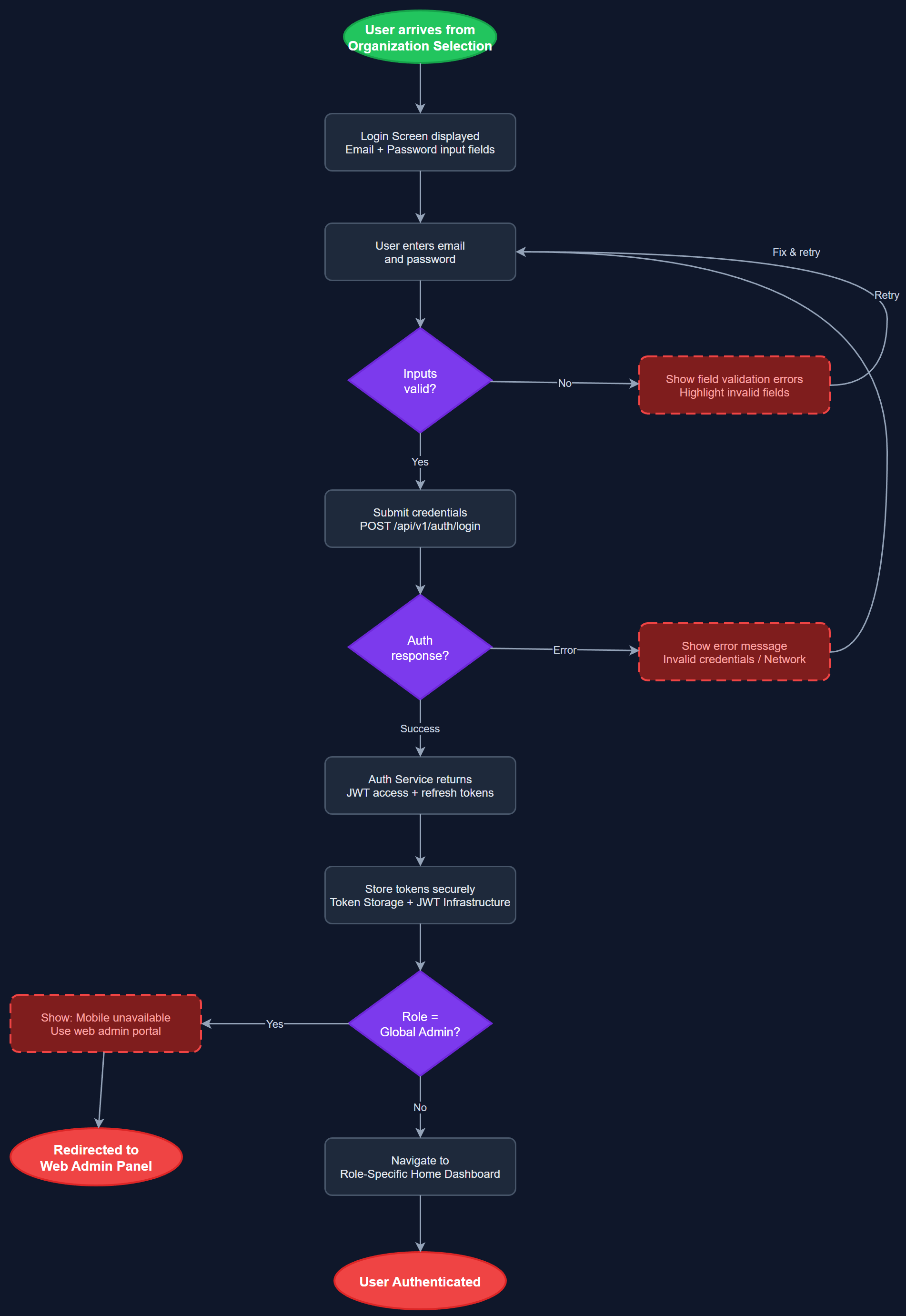
Analysis
Email and password login is the universal fallback that guarantees access for all user roles regardless of their ability or willingness to use BankID or Vipps. Coordinators and administrators frequently access the platform from contexts where BankID is impractical, making this a non-negotiable baseline. Secure token management ensures session continuity without requiring repeated authentication, reducing friction for daily users. This also supports the admin panel access pattern where HTTP-only cookies are used for web sessions, providing a consistent auth model across mobile and web surfaces.
The login screen is a stateless Flutter widget driven by a BLoC that manages form validation, loading, and error states. Credentials are submitted to POST /api/v1/auth/login, which returns a JWT access token and refresh token. The Token Storage component uses Flutter Secure Storage (backed by Keychain on iOS and Keystore on Android) to persist tokens. The REST API client's request interceptor automatically attaches the access token and handles token refresh via POST /api/v1/auth/refresh. Passwords are never stored; only tokens are persisted. All fields meet WCAG 2.2 AA touch target and contrast requirements.
Dependencies
Definition of Done
Components (59)
Shared Components
These components are reused across multiple features
User Interface (16)
Service Layer (13)
Data Layer (9)
Infrastructure (20)
User Stories
No user stories have been generated for this feature yet.