Document Attachment to Activities
Feature Detail
Description
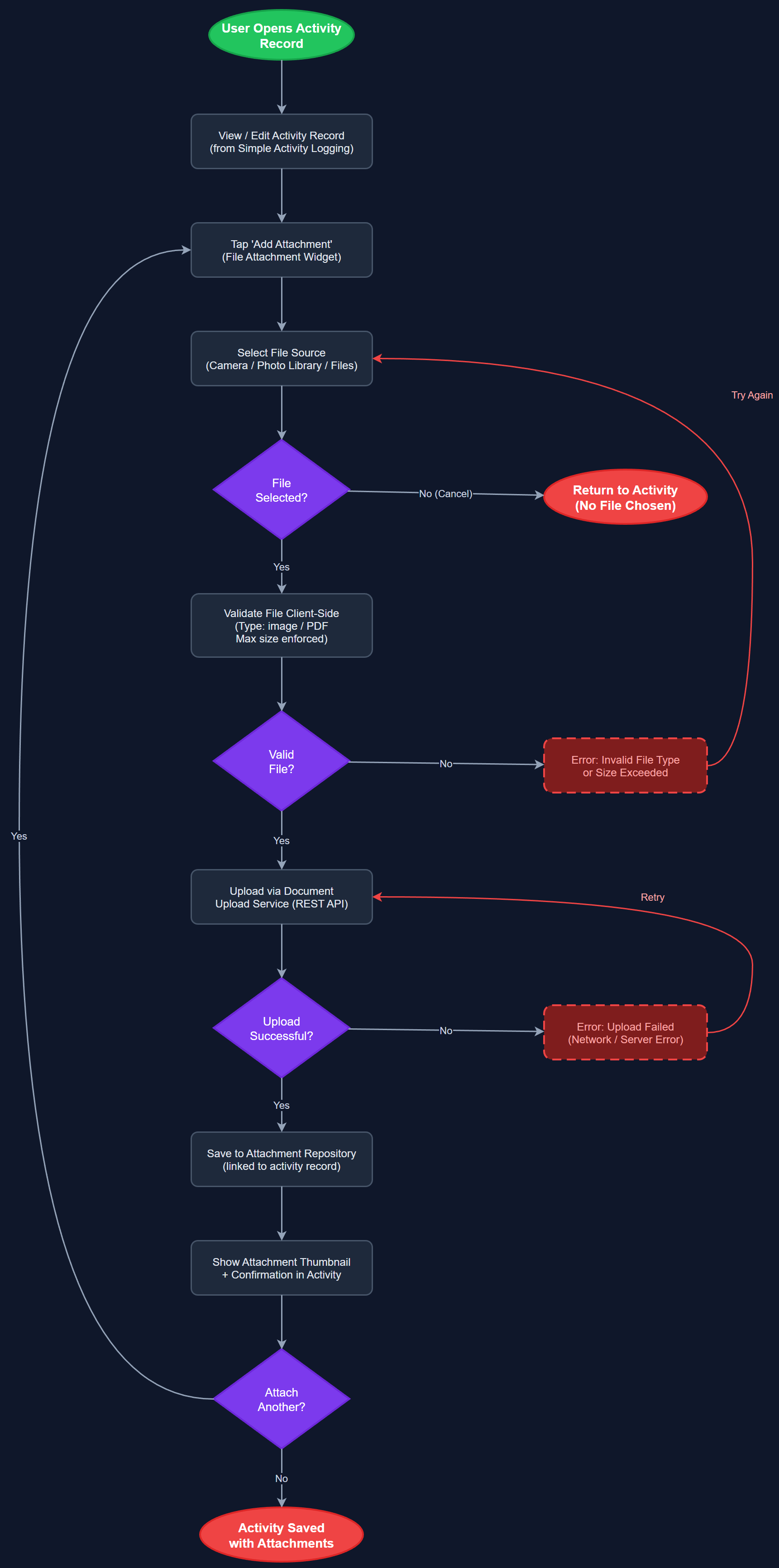
Allows peer mentors and coordinators to attach files — event invitations, photographs, screenshots, or PDF documents — to activity records as supporting evidence. Attachments serve as compliance verification material for Bufdir audits and provide additional context for coordinator review. Supported file types include images and PDFs, with client-side size validation enforced before upload. Attached documents are permanently linked to the activity record and accessible to authorized users in the admin panel.
User Flow
Analysis
NHF specifically identified document attachments as important for Bufdir compliance verification — inspectors may request evidence that reported activities occurred, including event invitations, Facebook screenshots, or sign-in sheets. Currently, coordinators maintain separate paper archives, creating administrative overhead and risk of lost documentation during audits. Digitizing attachments eliminates this parallel paper trail, permanently links evidence to the activity it supports, and dramatically reduces response time during compliance inquiries. For NHF, which manages 1,400 local associations, the audit risk mitigation value of digitized, linked evidence is substantial given the volume of publicly funded activities being reported.
FileAttachmentWidget wraps image_picker and file_picker Flutter plugins with in-app preview and deletion before submission. DocumentUploadService calls the backend upload endpoint, which returns a signed storage URL; the actual file is then PUT directly to object storage (S3-compatible or Vercel Blob) from the client to avoid routing large payloads through the API server. AttachmentRepository persists metadata (filename, MIME type, size, storage key, upload timestamp) with a foreign key to the activity record. Client-side validation enforces supported MIME types and a configurable maximum file size before upload begins. WCAG 2.2 AA compliance requires that file picker buttons have descriptive accessible labels, image previews include alt text, and error messages for invalid files are announced via Semantics.
Dependencies
Definition of Done
Components (63)
Shared Components
These components are reused across multiple features
User Interface (16)
Service Layer (13)
Data Layer (9)
Infrastructure (20)
User Stories
No user stories have been generated for this feature yet.