Digital Peer Mentor Certificate & Credentials
Feature Detail
Description
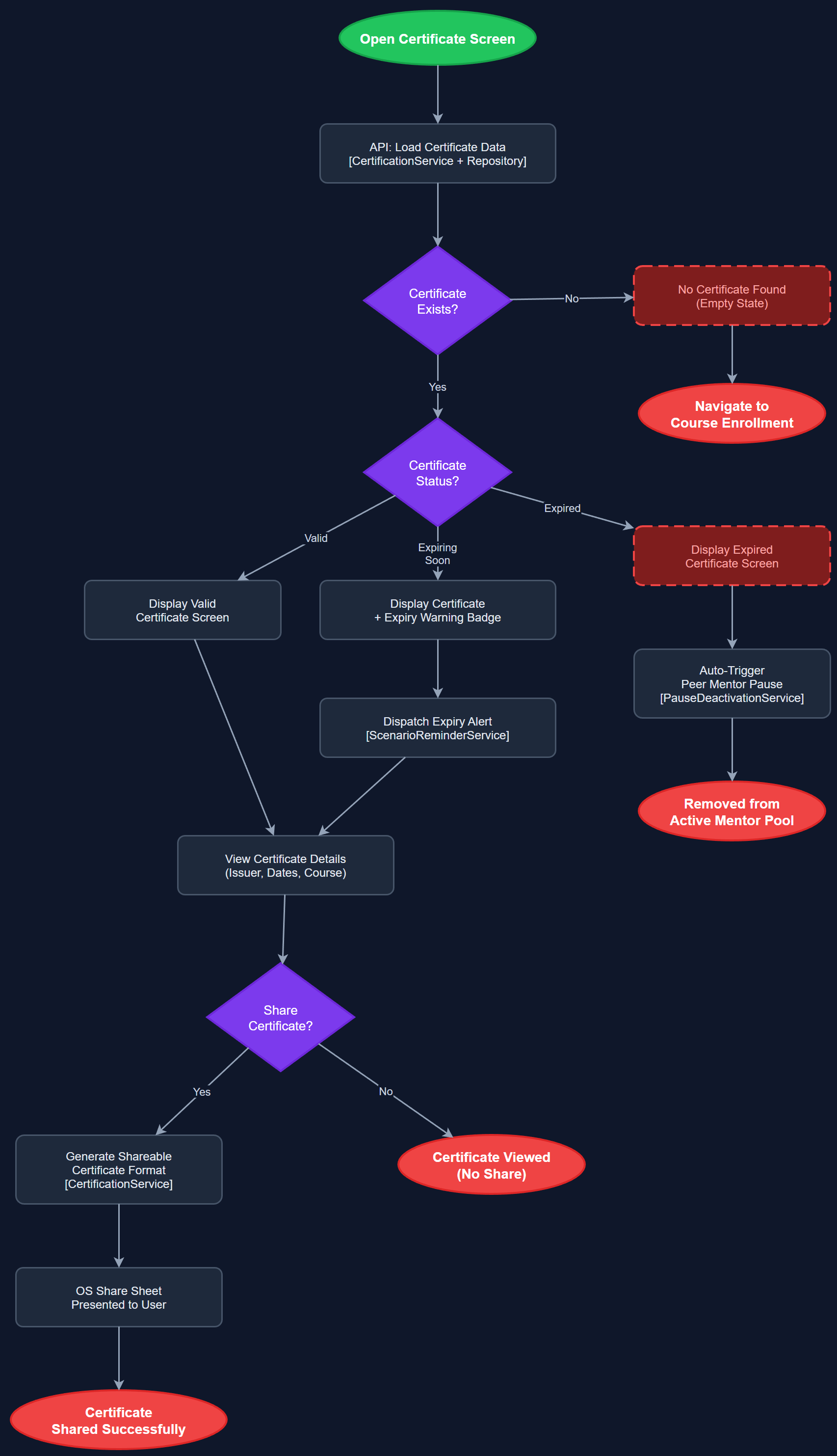
This feature provides peer mentors with a digital representation of their certification status, including issuance date, expiry date, and the issuing organization. The certificate is displayed as a visually distinct screen within the app and can be shared or presented as proof of active certification. Expiry tracking triggers automated alerts before a certificate lapses, and expired certificates automatically remove the peer mentor from active matching pools. The feature merges Digital Certificate, Peer Mentor Credential, and Certification Expiry Tracking into a unified credential lifecycle.
User Flow
Analysis
HLF explicitly identified the physical peer mentor card as an 'adelsmerke' — a badge of honour — making the digital equivalent a high-value motivational feature. Digital certificates eliminate the operational friction of physical card issuance while preserving the prestige of certification. Automated expiry alerts prevent the scenario where a peer mentor unknowingly operates with a lapsed credential, which carries reputational and compliance risk for the organization. Linking expiry to automatic deactivation from local association websites reduces manual oversight burden on coordinators and ensures the public-facing directory always reflects current, qualified peer mentors.
Certificates are stored in the certifications table linked to users and courses. The Flutter certificate display screen uses a card-style widget with the design token system, showing name, organization, issue date, and expiry prominently. Expiry alerts are implemented via the Scheduled Notification Infrastructure with configurable lead times (e.g., 30 days, 7 days before expiry). On expiry, a status flag is set via the Peer Mentor Service and propagated to the pause/deactivation flow. The physical card remains a parallel artifact; the app does not attempt to replace it but complements it. PDF export of the digital certificate is a v2 enhancement. Admin panel allows coordinators to manually issue or revoke certificates.
Dependencies
Definition of Done
Components (64)
Shared Components
These components are reused across multiple features
User Interface (16)
Service Layer (13)
Data Layer (9)
Infrastructure (20)
User Stories
No user stories have been generated for this feature yet.