Coordinator Team Reports
Feature Detail
Description
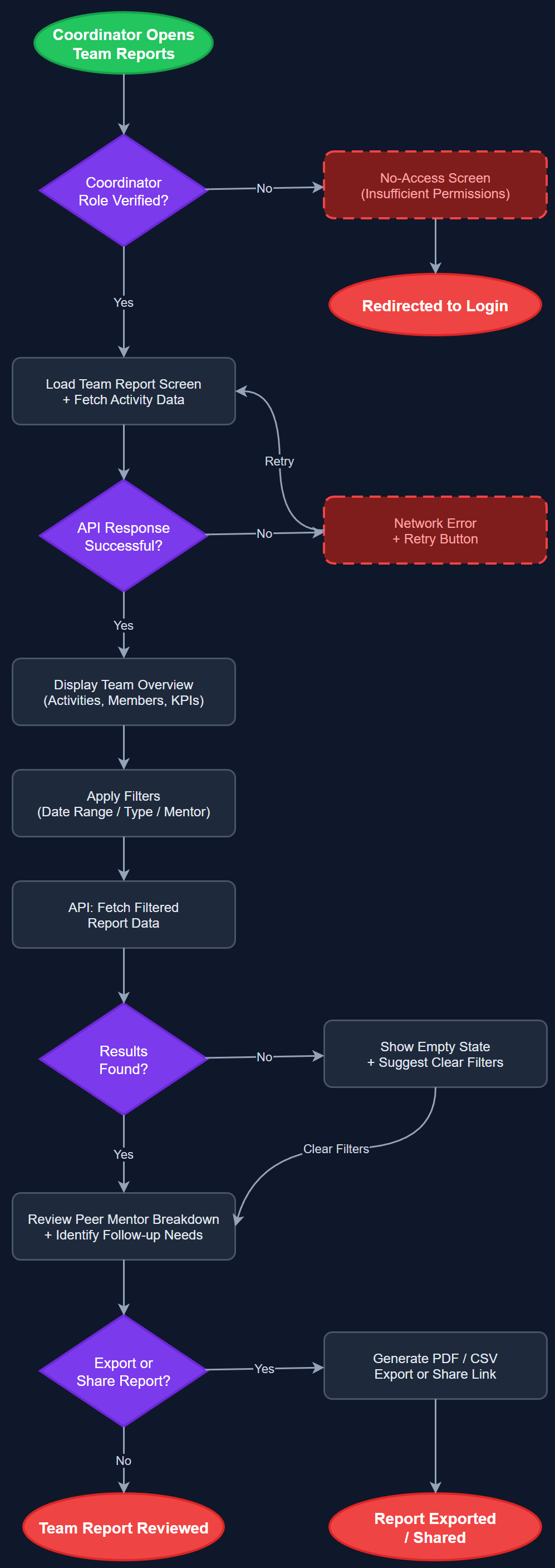
This feature gives coordinators a team-level reporting view showing aggregated activity data across all peer mentors within their local association. Coordinators can filter by date range, activity type, and individual peer mentor to identify who is active, who may need follow-up, and how the team is performing collectively. The report supports export or sharing capabilities and provides the visibility coordinators need to manage their volunteers effectively and compile data for their regional or national organization.
User Flow
Analysis
Coordinators are the operational backbone of all three organizations, yet they currently rely on manual Excel aggregation or individual follow-ups to understand team performance. This feature eliminates that overhead by providing real-time team visibility. It enables proactive management — identifying inactive volunteers before they disengage, recognizing high performers, and ensuring equitable distribution of assignments. For NHF specifically, where a coordinator may oversee volunteers across multiple local associations, team reports are essential for preventing duplication and ensuring complete coverage. The feature also feeds directly into Bufdir reporting requirements, making the coordinator's quarterly reporting burden significantly lighter.
The coordinator report screen is a Flutter page restricted by role guard to Coordinator and above roles. The backend exposes a filtered aggregation endpoint on the Next.js API that accepts query parameters for association_id, date_from, date_to, peer_mentor_id, and activity_type_id. PostgreSQL CTEs compute per-mentor totals joined against the peer_mentors and user_organization_roles tables, scoped to the requesting coordinator's association. The Flutter UI presents a sortable list of peer mentors with summary stats and a drill-down to individual activity logs. Filter widgets use Riverpod providers for reactive updates. Export functionality (CSV or PDF) is handled server-side to keep the mobile payload small. All role-scoping enforced at API middleware level.
Dependencies
Definition of Done
Components (64)
Shared Components
These components are reused across multiple features
User Interface (16)
Service Layer (13)
Data Layer (9)
Infrastructure (20)
User Stories
No user stories have been generated for this feature yet.