Contact List & Search
Feature Detail
Description
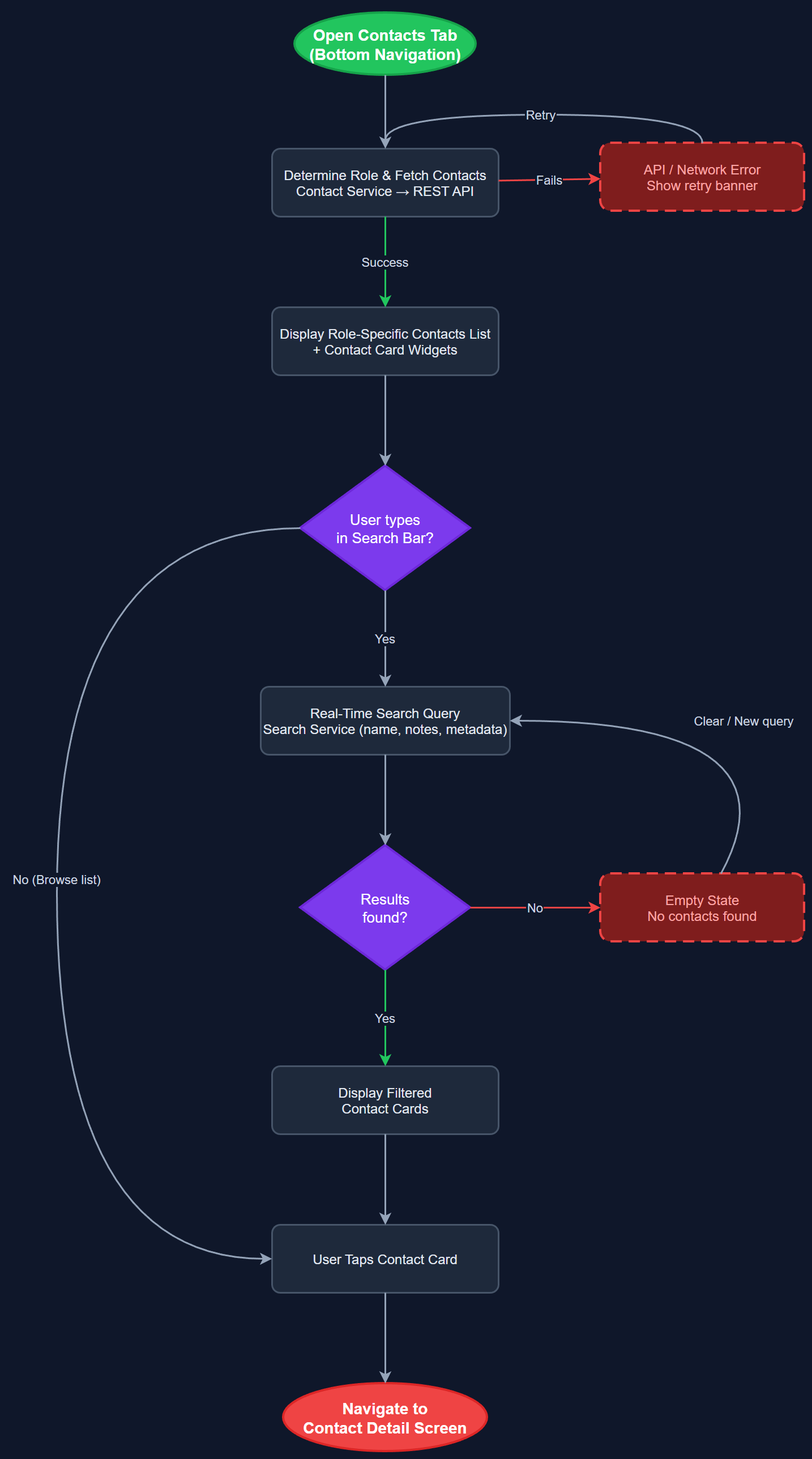
This feature provides a unified contact list screen that displays all contacts associated with a peer mentor or coordinator, along with a powerful search capability covering both contacts and notes. The list supports role-specific views so coordinators see their full peer mentor roster while peer mentors see their assigned contacts. Search is real-time and covers names, notes content, and contact metadata, reducing the time needed to locate a specific person. The feature merges the previously separate Contact List and Basic Search for Contacts and Notes capabilities into a single cohesive experience.
User Flow
Analysis
Efficient contact management is foundational to the daily workflow of peer mentors and coordinators. Without quick access to contacts, activity registration becomes friction-heavy because users must remember details manually before logging interactions. A unified search that spans both contacts and notes eliminates the need to navigate multiple screens, directly reducing cognitive load — a top priority for organizations serving users with cognitive and sensory challenges. For coordinators managing dozens of peer mentors, the list and search feature is the primary navigation hub that all other workflows branch from, making its quality and responsiveness critical to overall app satisfaction and adoption rates.
Built as a Flutter screen backed by a BLoC or Riverpod state management layer. The local SQLite database (via the offline-support-sync feature) indexes contact names and note content for fast full-text search using FTS5. Remote search falls back to a debounced REST API call to `/api/v1/contacts?q=` when the local index is stale. Role-specific views are enforced by the Role Guard Service injecting the current user's role into the query context. Contact cards use the shared ContactCardWidget and PeerMentorCardWidget components. The view switcher widget allows toggling between contacts and peer mentors list modes. All list items meet WCAG 2.2 AA touch target requirements (minimum 44×44 dp) and carry semantic labels for screen reader support.
Dependencies
Definition of Done
Components (63)
Shared Components
These components are reused across multiple features
User Interface (16)
Service Layer (13)
Data Layer (9)
Infrastructure (20)
User Stories
No user stories have been generated for this feature yet.