Contact Detail & Edit
Feature Detail
Description
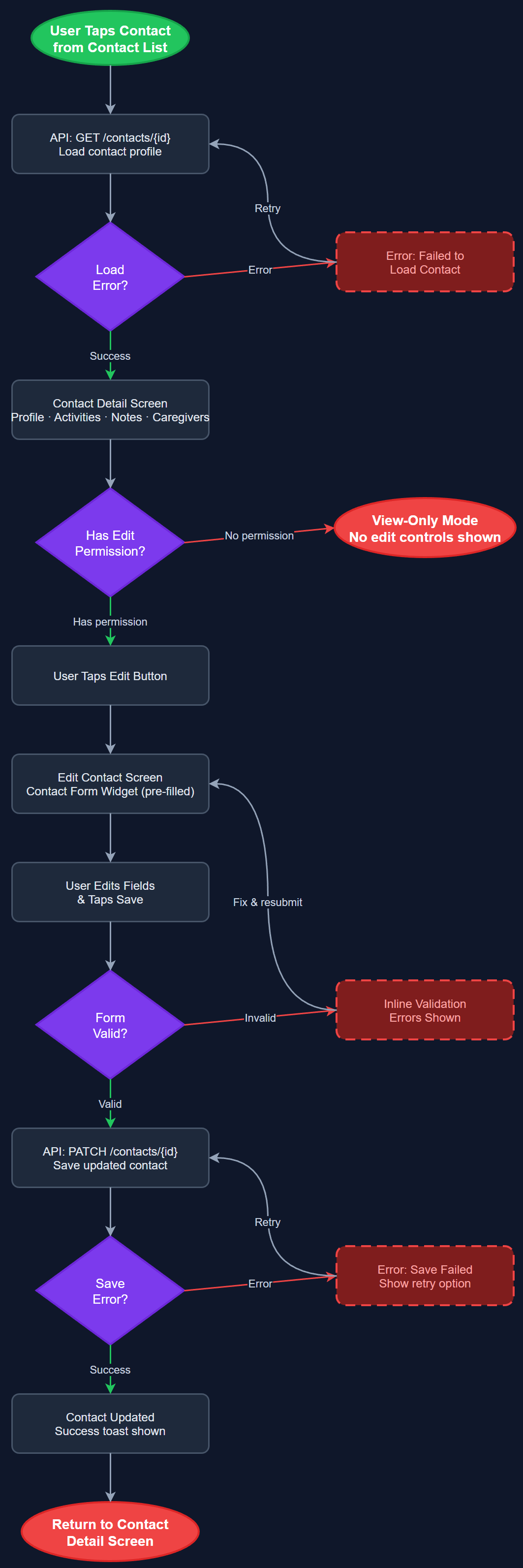
This feature provides a dedicated screen for viewing the full profile of a contact, including personal details, associated activities, notes, and caregiver relationships. An edit flow allows authorized users to update contact information through a validated form. The detail screen serves as the central hub for all information related to a single contact, surfacing linked activities, notes, and relationships in a structured layout. Edit access is gated by role — peer mentors can edit their own contacts while coordinators can edit any contact within their local association.
User Flow
Analysis
Accurate and up-to-date contact information is essential for effective peer mentoring. When a peer mentor visits a contact, they need immediate access to health context, previous interaction history, and caregiver details without switching between apps. The edit capability ensures data stays current without requiring coordinator intervention for every change, distributing the administrative burden appropriately. For organizations like Blindeforbundet that require formalized home visit reporting, the contact detail screen is the launching point for structured reports, making its completeness and usability directly tied to reporting compliance and Bufdir audit readiness.
The detail screen is a Flutter screen composed of sectioned cards: personal info, recent activities, notes preview, and caregiver links. Data is fetched via the Contact Service from the REST API (`/api/v1/contacts/:id`) and cached locally. The edit flow uses a shared ContactFormWidget with field-level validation matching backend constraints. Optimistic updates are applied locally and synced via the Sync Service. Role-based field visibility is enforced client-side by the Role Guard Service, with server-side enforcement on PATCH `/api/v1/contacts/:id`. All form fields use AppTextField widgets from the design system, ensuring consistent styling and accessibility. The ContactFormWidget supports dynamic field labels via the Organization Labels system to accommodate per-org terminology.
Dependencies
Definition of Done
Components (61)
Shared Components
These components are reused across multiple features
User Interface (16)
Service Layer (13)
Data Layer (9)
Infrastructure (20)
User Stories
No user stories have been generated for this feature yet.