Calendar Synchronization
Feature Detail
Description
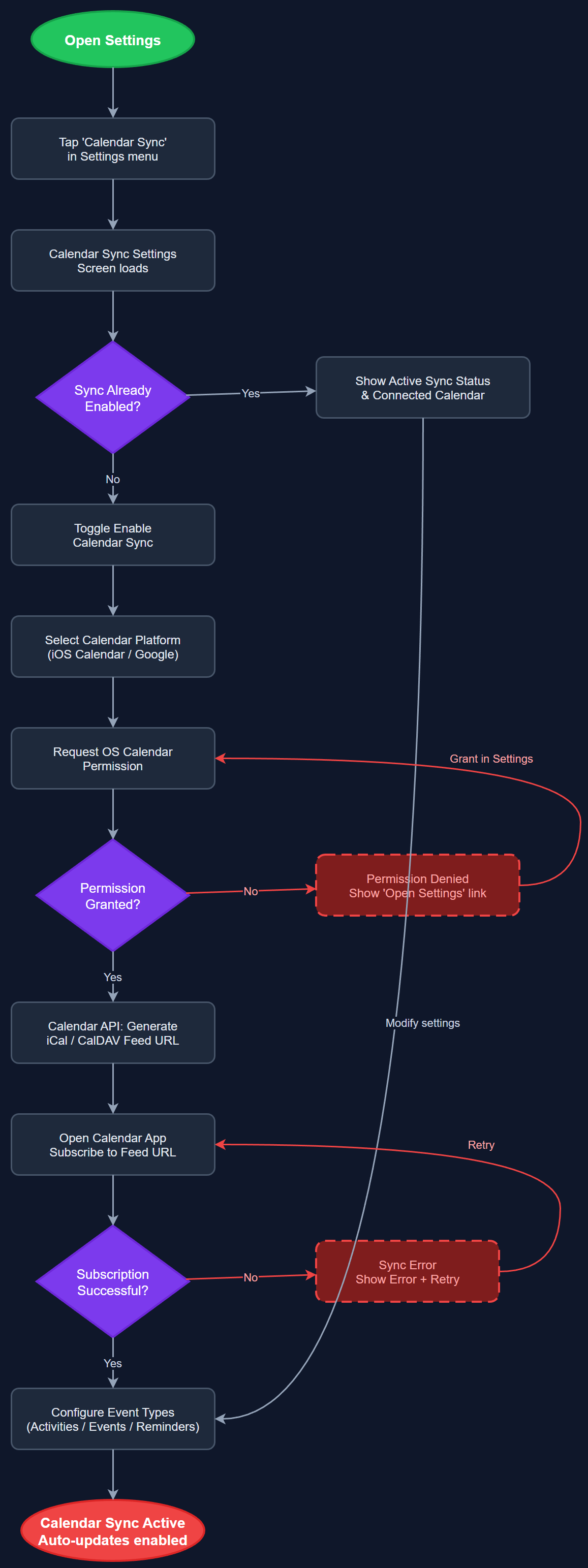
Calendar Synchronization allows peer mentors and coordinators to sync their activity schedule and upcoming events from the platform into their personal calendar applications (iOS Calendar, Google Calendar) using standard iCal/CalDAV protocols. Users can enable calendar sync from the settings screen and choose which event types to include. Once enabled, new activities, events, and reminders are automatically reflected in the user's external calendar, reducing the need to manually duplicate scheduling information and ensuring peer mentors never miss planned visits or meetings.
User Flow
Analysis
Calendar synchronization addresses the coordination friction that arises when peer mentors manage their volunteer activities alongside personal and professional commitments in separate calendar systems. HLF specifically highlighted follow-up and scheduling as areas where 40% of peer mentors reported dissatisfaction. By integrating with the calendar systems users already rely on daily, the platform reduces cognitive load and increases the likelihood that scheduled activities are actually completed. For coordinators managing multiple peer mentors, calendar visibility also supports workload planning and reduces scheduling conflicts within local associations, contributing directly to improved activity completion rates and Bufdir reporting accuracy.
Implementation uses the flutter_calendar_connect or add_2_calendar package on the Flutter side for one-tap event export to the device's native calendar. For ongoing sync, the backend exposes a per-user iCal feed endpoint (e.g., /api/v1/users/{id}/calendar.ics) secured with a user-specific token, which calendar apps can subscribe to for automatic updates. The iCal feed is generated server-side from the PostgreSQL activities and events tables, serialized using the ical.js-compatible format. Users configure sync in the Calendar Sync Settings screen, where they authenticate the connection and select event type filters. The backend stores sync preferences in the settings table. Privacy must be considered: calendar entries for encrypted assignments (Blindeforbundet) must not include sensitive personal details in the calendar title or description, instead using generic labels like 'Assignment follow-up'.
Dependencies
Definition of Done
Components (62)
Shared Components
These components are reused across multiple features
User Interface (16)
Service Layer (13)
Data Layer (9)
Infrastructure (20)
User Stories
No user stories have been generated for this feature yet.