Biometric Authentication (Face ID / Fingerprint)
Feature Detail
Description
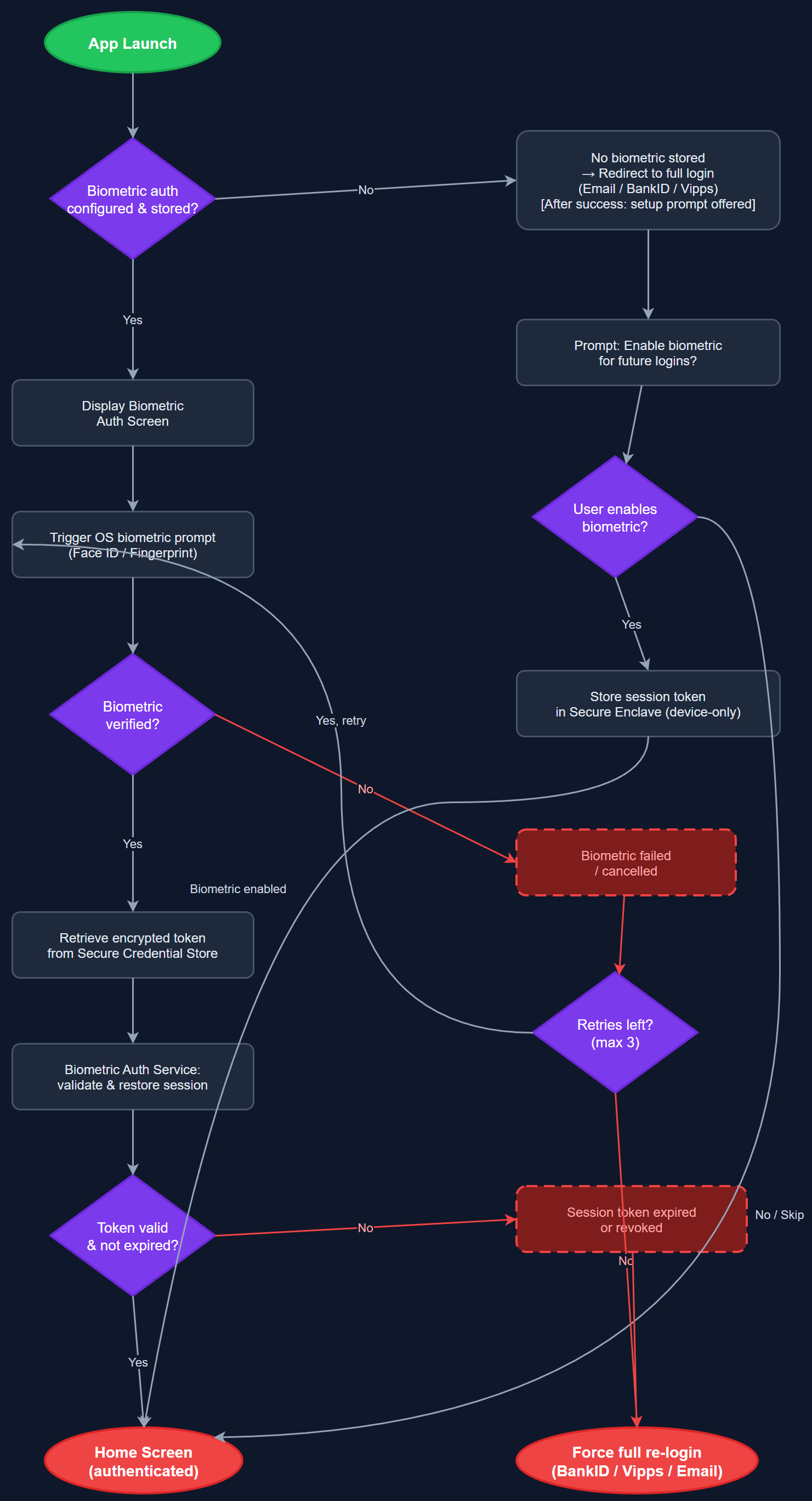
This feature enables Face ID and fingerprint authentication for returning users after their initial BankID, Vipps, or email/password login. The biometric prompt replaces the need to re-enter credentials on every app launch, significantly reducing friction for daily users such as peer mentors who log activities multiple times per day. Credentials are stored in the device's secure enclave and never leave the device; biometric authentication simply unlocks the stored session token to resume the authenticated session.
User Flow
Analysis
Peer mentors register activities frequently throughout their workday, making fast and frictionless re-authentication essential to adoption. Requiring full BankID authentication every session would create unacceptable friction and drive users back to paper-based or Word-based workflows. Biometric authentication preserves security (credentials never leave the device's secure enclave) while dramatically lowering the interaction cost of each app session. This is especially important for the target demographic, which includes users with motor and cognitive impairments who benefit from reduced input requirements and touch-based authentication.
Implemented using the local_auth Flutter plugin, which wraps iOS LocalAuthentication (Face ID / Touch ID) and Android BiometricPrompt APIs. The Secure Credential Store uses Flutter Secure Storage to persist the refresh token, encrypted at rest using AES-256. On successful biometric verification, the stored refresh token is read and exchanged for a new access token via POST /api/v1/auth/refresh. The Biometric Auth Service handles capability detection (checks if biometrics are enrolled and available), fallback to PIN/password if biometrics fail, and graceful degradation on devices without biometric hardware. Users can disable biometric login from Settings.
Dependencies
Definition of Done
Components (62)
Shared Components
These components are reused across multiple features
User Interface (16)
Service Layer (13)
Data Layer (9)
Infrastructure (20)
User Stories
No user stories have been generated for this feature yet.