Admin Reimbursement Oversight
Feature Detail
Description
This feature provides Coordinators and Organization Administrators with a centralized view of all reimbursement requests submitted by peer mentors, enabling them to review, approve, or reject expense claims and travel reimbursements within their organizational scope. The oversight screen displays pending, approved, and rejected reimbursements with filtering by peer mentor, expense type, amount range, and date. Administrators can view attached receipts, verify claimed distances and amounts, and apply approval decisions individually or in bulk. The feature integrates with the threshold-based automatic approval rules (under 50 km or no receipts), surfacing only the claims that require manual review.
User Flow
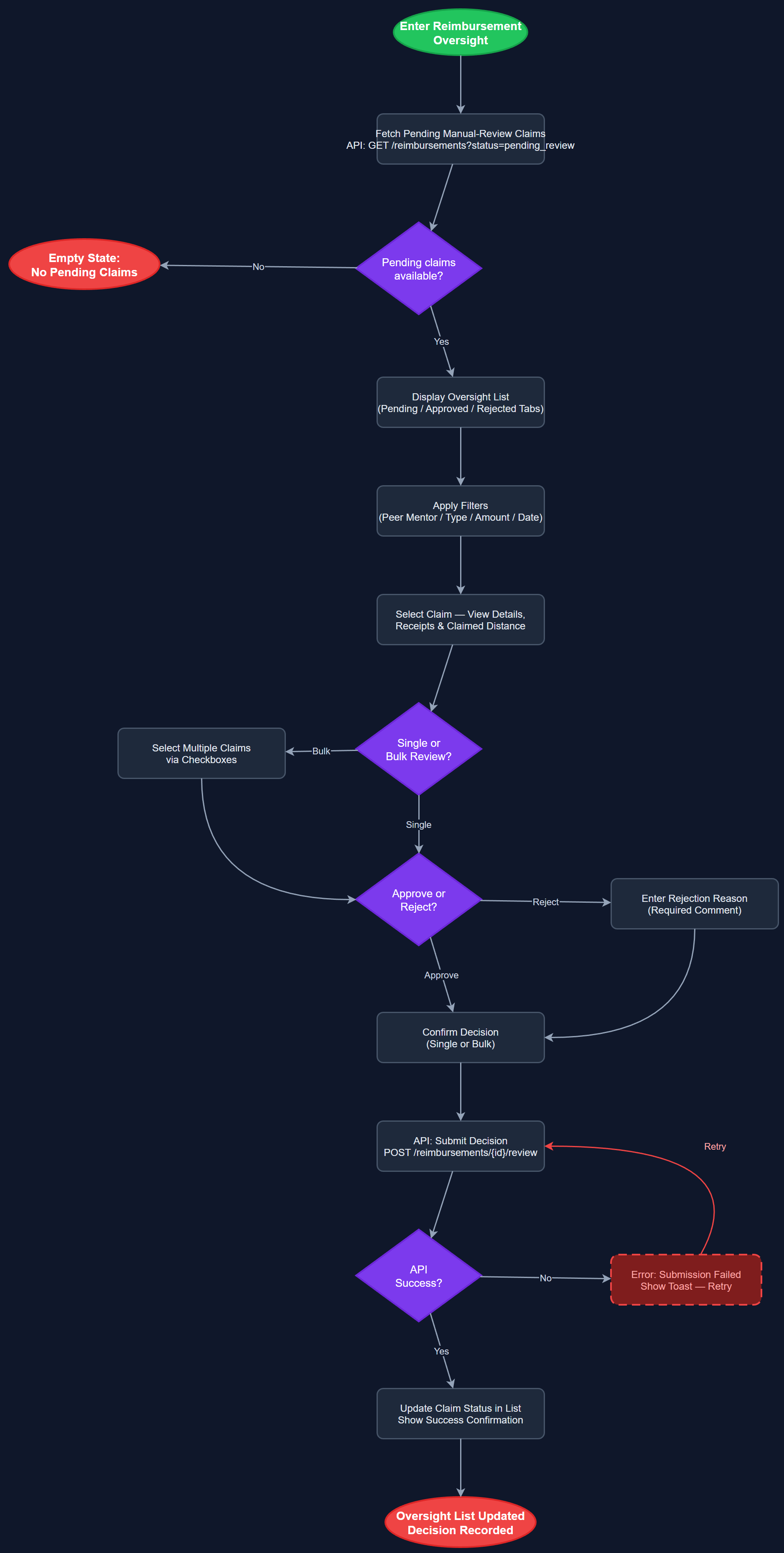
Analysis
Reimbursement management is a significant administrative burden for coordinators at HLF and Blindeforbundet, both of which have detailed expense rules including mileage limits, receipt requirements, and honorarium thresholds. Without a structured oversight interface, coordinators must process reimbursement requests via email or paper forms, creating delays and errors. This feature closes the loop between peer mentor expense registration (mobile app) and coordinator approval (admin panel), enabling a fully digital reimbursement workflow that reduces processing time and ensures consistent application of organizational policies. For organizations with API integrations to accounting systems (Xledger, Dynamics), this approval step is the gateway before data flows to the external system.
The reimbursement oversight screen is a Next.js page fetching data from /api/v1/admin/reimbursements with query parameters for filtering and pagination. Reimbursement records join to expenses, receipts, and users tables; receipt images are stored in object storage (e.g., Vercel Blob or S3-compatible) and served via signed URLs to prevent unauthorized access. Approval actions POST to /api/v1/admin/reimbursements/{id}/approve or /reject, with role-scoping enforced at the API layer. Bulk approval is implemented as a POST to /api/v1/admin/reimbursements/bulk-approve with an array of IDs. The automatic approval threshold logic runs at submission time on the backend, so the admin view only shows claims that passed into the manual review queue. Future integration with Xledger or Dynamics accounting APIs will be triggered post-approval via webhook or scheduled export job.
Dependencies
Definition of Done
Components (61)
Shared Components
These components are reused across multiple features
User Interface (16)
Service Layer (13)
Data Layer (9)
Infrastructure (20)
User Stories
No user stories have been generated for this feature yet.