Admin Bufdir Report Export
Feature Detail
Description
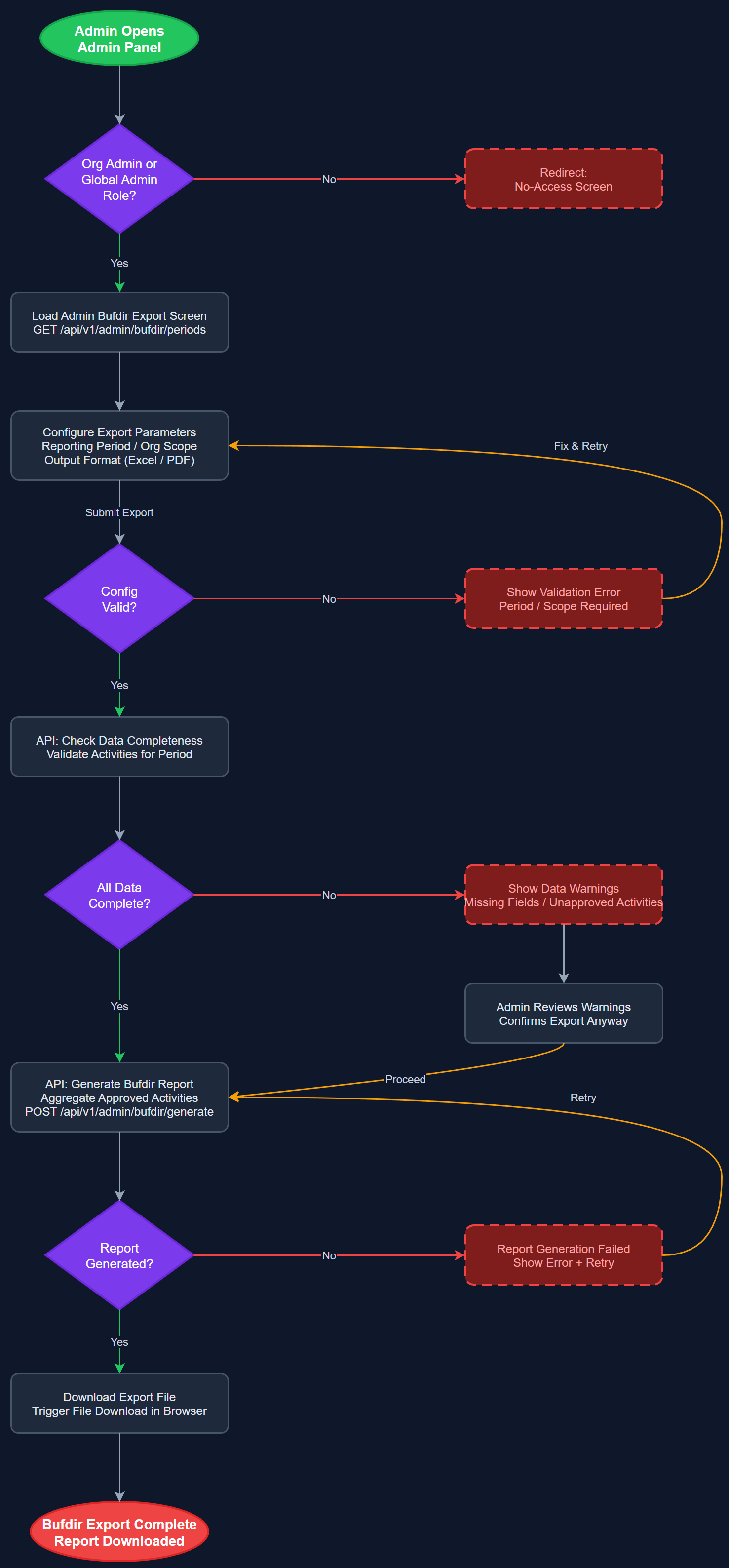
This feature enables Organization Administrators and Global Administrators to generate and export Bufdir-compliant reports with a single action, aggregating all approved activities within a selected reporting period into the format required for government grant applications. The export screen allows selection of reporting period, organization scope, and output format, then triggers report generation and file download. The system validates data completeness before export and surfaces warnings if required fields are missing or activities are unapproved. This feature is the admin-panel counterpart to the peer-mentor-facing statistics feature and represents the culmination of the entire activity registration pipeline.
User Flow
Analysis
All four partner organizations depend on Bufdir grant funding, and report generation is currently one of the most time-consuming administrative tasks — involving manual Excel aggregation, cross-referencing Word forms, and formatting output to Bufdir's requirements. A one-click export that produces a ready-to-submit report eliminates hours of manual work per reporting cycle and dramatically reduces the risk of errors that could delay or reduce funding. Norse Digital Products has also committed to initiating dialogue with Bufdir on behalf of all organizations to standardize the reporting format, making this feature a platform-level competitive advantage. Reliable, automated Bufdir reporting is one of the strongest value propositions for organizational adoption of the platform.
Report generation is handled by a dedicated API endpoint (/api/v1/admin/reports/bufdir) that executes a complex aggregate SQL query against PostgreSQL, joining activities, users, organizations, and activity_types tables filtered by the requested period and organization scope. Report output is generated server-side as CSV or Excel (using a library such as exceljs) and streamed to the client as a file download. Generation for large organizations may take several seconds — a progress indicator and async job pattern (enqueue generation, poll for completion, download when ready) should be considered for robustness. The report schema must be kept in sync with Bufdir's current submission format; a configuration file defines the column mapping so it can be updated without code changes. All generated reports are logged in the generated_files table for audit purposes.
Dependencies
Definition of Done
Components (63)
Shared Components
These components are reused across multiple features
User Interface (16)
Service Layer (13)
Data Layer (9)
Infrastructure (20)
User Stories
No user stories have been generated for this feature yet.