Activity Registration Wizard
Feature Detail
Description
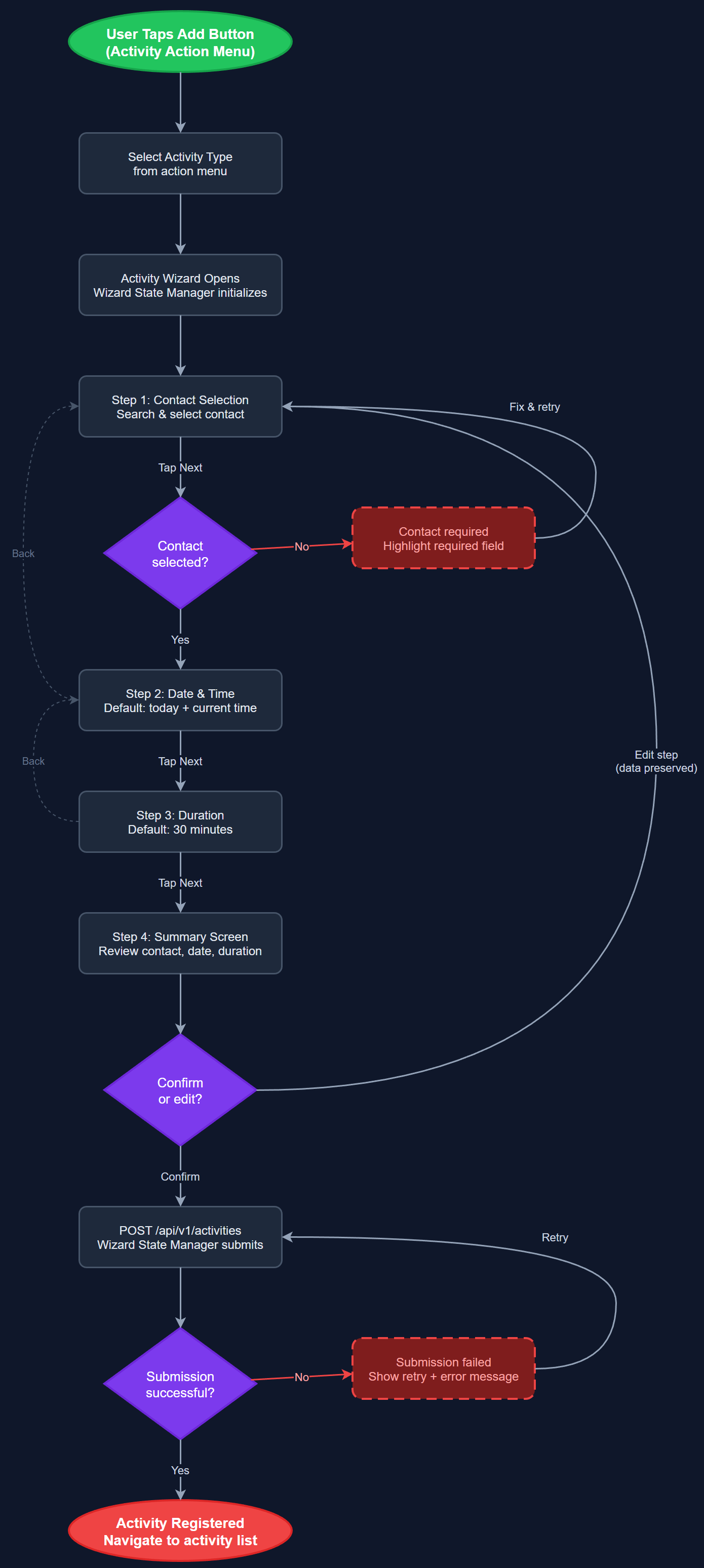
Multi-step guided wizard for registering activities requiring detailed input across sequential steps: contact selection, date and time, duration, and a final summary confirmation screen. Each step validates independently and supports backward navigation without data loss. Merges the Activity Wizard, Multi-Step Activity Form, Contact Selection Step, Date and Time Step, and Duration Step into a single cohesive, accessible flow that accommodates all peer mentor profiles including those with cognitive and motor accessibility needs.
User Flow
Analysis
The wizard addresses activities that cannot be captured by the fast one-tap flow — multi-contact visits, events with specific scheduling, and activities feeding into reimbursement requests. Breaking data entry into focused single-purpose steps reduces input errors and ensures completeness for records used in Bufdir reports. The summary confirmation step reduces correction requests and coordinator follow-up overhead. For coordinators, wizard-registered activities arrive with complete structured metadata, eliminating the manual reconciliation work that currently consumes significant coordination time across all three organizations and directly improving data quality for downstream reporting.
Implemented as a Flutter PageView-based stepper with WizardStateManager BLoC persisting form state across steps. Each step is a standalone widget communicating through the shared BLoC, enabling independent unit testing. Contact selection integrates with the local ContactRepository cache for offline support. Date and time pickers are custom WCAG-compliant widgets with 44×44px targets and keyboard-accessible number inputs. Wizard state is serialized to local storage so in-progress registrations survive app backgrounding. The wizard accepts a proxy context parameter for coordinator bulk registration reuse, and supports deep-link entry from the activity action menu. Navigation uses back-button patterns, not swipe gestures, per WCAG 2.2 dragging movement requirements.
Dependencies
Definition of Done
Components (66)
Shared Components
These components are reused across multiple features
User Interface (16)
Service Layer (13)
Data Layer (9)
Infrastructure (20)
User Stories
No user stories have been generated for this feature yet.